
A TradingView alerts alternative for price levels on Android
If you use TradingView alerts only to hear when a price crosses a level, a dedicated alert app does that job on an Android phone and can make it ring like an alarm. Crypto Alerts & Alarms watches a level or a percentage move on one exchange’s pair, or on a Solana token, and can ring full-screen through silent mode. If your alerts depend on indicators, drawings, Pine Script or strategies, or you need webhooks, email or alerts on the web and desktop, TradingView remains the better tool.
We make Crypto Alerts & Alarms and are not affiliated with TradingView. Everything said about TradingView here is quoted or summarised from its help centre, its Pine Script documentation and its Google Play listing, each linked, all checked on 28 October 2026.
Android only for now. An iPhone version is in development.
What TradingView alerts do well
TradingView is a charting platform first, and its alerts can watch much of what you can put on a chart. From its own help pages:
- Indicators, drawings, patterns and strategies. Alerts on “over a thousand TradingView indicators, including community-created ones”, on lines, channels, rectangles and Fibonacci tools, on automatically detected chart patterns, and on Pine Script strategies and scripts.
- More conditions than a level. Entering or leaving a channel, and moving up or down by an amount or a percentage within a set number of bars.
- Watchlist alerts. One alert across a whole watchlist, working separately for each symbol.
- Every screen you use. Alerts work on the website and in the desktop and mobile apps, and they run on TradingView’s servers, so they keep going with TradingView closed. Its Google Play listing says charts, watchlists and alerts “sync automatically between the app, web and desktop”.
- Many ways to be told. A push to its app, a pop-up in the browser, email, a sound, plain text to a second email address, and a webhook that posts the alert to a URL you choose.
- Quiet hours. A notification schedule per alert, so it can stay silent at weekends or outside working hours while the log still records each trigger.
- Markets beyond crypto. Its Google Play listing says its data covers “3,500,000+ instruments from 100+ global exchanges”.
If you rely on any of these, keep those alerts in TradingView.
Where a dedicated app is simpler: a price level on your phone
Sometimes all an alert needs is a number: tell me if BTC/USDT on Binance goes above one price or below another. That needs no chart, and on Android it can be made loud enough to wake you.
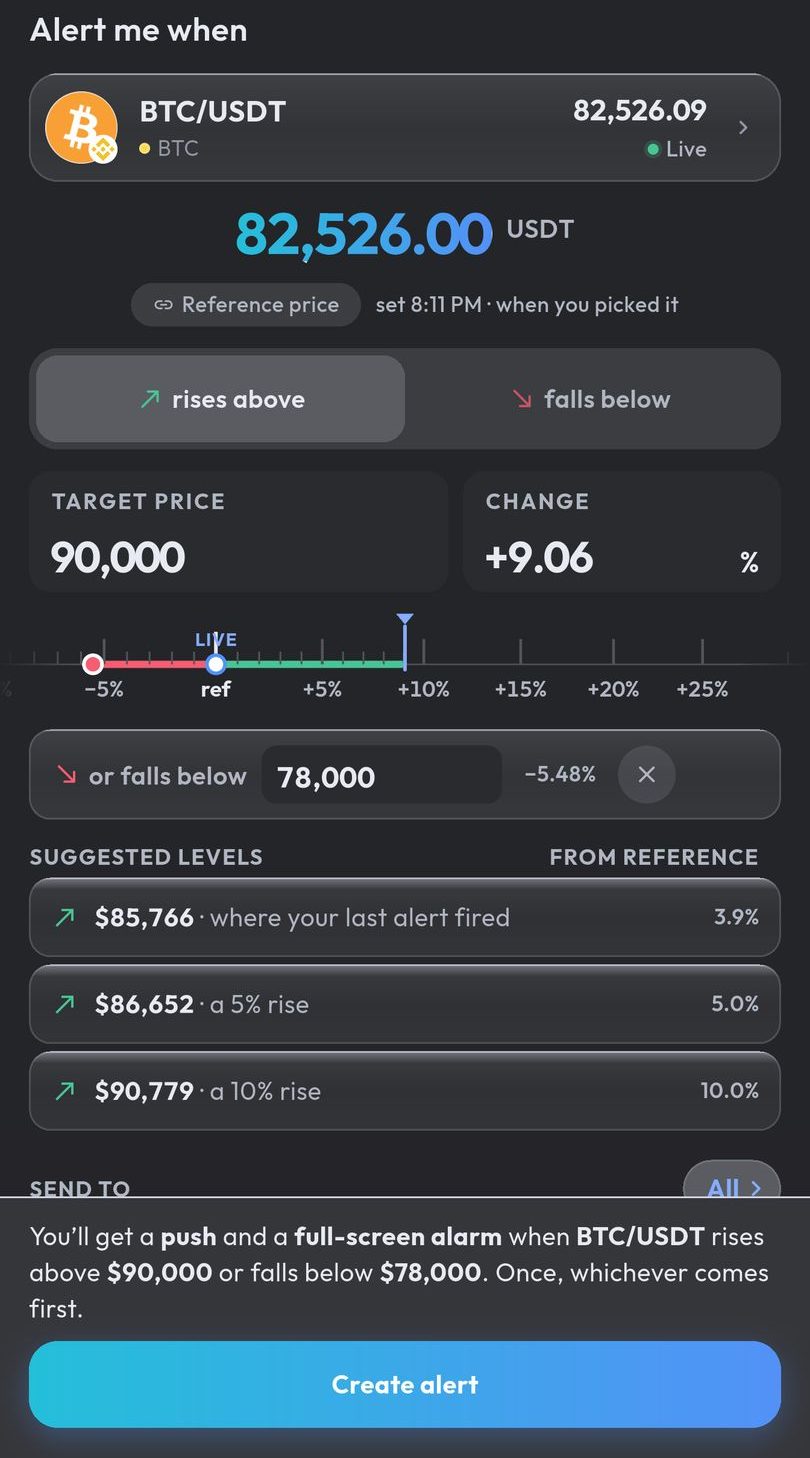
In Crypto Alerts & Alarms you search for the coin, pick the exchange and pair, and set a price to rise above, fall below, or one of each; or a percentage move from the price when you set the alert. It fires once, or repeats with a pause of 5 minutes to a day between firings. Prices are watched on our servers, so alerts fire with the app closed.
It covers over 5,000 pairs across more than 1,200 coins on Binance, Coinbase, Kraken, Bybit and KuCoin, plus any Solana token by name or mint address once it has a live pool on PumpSwap, Raydium, Orca or Meteora DLMM.
What it does not do: charts, indicator alerts such as RSI or moving averages, drawings, strategies, webhooks, email, SMS, and futures, funding or liquidation alerts. Its prices come only from those five exchanges and from Solana pools. It runs on Android only for now; an iPhone version is in development.
How each one gets your attention
| TradingView alerts | Crypto Alerts & Alarms | |
|---|---|---|
| Runs on | Website, desktop app, and apps for iPhone and Android | Android; an iPhone version is in development |
| What an alert can watch | Prices, indicators, drawings, chart patterns, strategies and whole watchlists | A price level or a percentage move on one exchange pair; Solana tokens by mint address |
| Where alerts are checked | On TradingView’s servers | On our servers |
| On an Android phone | A push notification from its app, when Notify in app is ticked | A push notification, which can ring as a full-screen alarm over the lock screen |
| Phone on silent | With the phone muted, Android keeps notifications silent | The alarm rings through silent mode |
| Do Not Disturb | Gets through if you allow TradingView as an exception | The alarm is posted as an Android alarm, so it is built to come through modes that allow alarms |
| Other ways to be told | Browser pop-up, sound, email, plain text, webhook | Telegram |
| Telegram | Through a webhook and a bridge service (see below) | Built in: connect a chat once, and alerts can go there as well as to your phone |
| Quiet hours | A notification schedule per alert | Not offered |
| Charts and analysis | A full charting platform | None |
Android’s rules: volume and mute and Do Not Disturb, from Google’s Android Help. The TradingView help pages we read describe its phone alerts as push notifications; none describes an alarm that rings through silent mode.
Can you send TradingView alerts to Telegram?
Not as a built-in option. The ways TradingView’s help lists for an alert to reach you are the ones above, and its Pine Script documentation answers “How can I send alerts to Telegram?” like this: “Sending TradingView alerts directly to Telegram is challenging due to protocol differences and formatting requirements. One solution is to use an intermediary service, which receives webhook alerts from TradingView, formats them as required by Telegram, and then forwards them to a Telegram bot.” It names Zapier, Integromat and Pipedream as such services, or a script of your own in Node.js or Python.
So the chain is a TradingView alert with a Webhook URL, a bridge that reformats it, and a Telegram bot that posts it. TradingView’s help adds that webhook alerts are only allowed once two-factor authentication is on, that you should never put logins or passwords in a webhook’s URL or message, and that webhooks may occasionally fail to arrive, which the Webhook status column of the alert log shows.
Crypto Alerts & Alarms does not connect to TradingView and cannot receive or forward TradingView alerts. It sends its own price alerts to Telegram instead. You connect a chat once: the app opens your chat with its bot, you tap Start, and the app confirms by itself. After that, any alert can go to Telegram as well as to your phone. The bot sends only your alerts, and /stop ends it. More on crypto price alerts in Telegram.
Moving a price-level alert across
- In TradingView’s alert manager, note the alert’s symbol with its exchange prefix (TradingView shows the prefix there rather than in the alert dialog), its level and its direction.
- Install Crypto Alerts & Alarms, search for the coin and pick the same exchange and pair, for example BTC/USDT on Binance. If the TradingView symbol comes from another exchange, choose the pair you actually watch; prices differ slightly from one exchange to the next.
- Type the level as rises above or falls below, or add one of each so a single alert covers both sides.
- Choose how it reaches you: every alert comes as a push, which you can make ring as the full-screen alarm, and it can go to Telegram as well once you have connected a chat.
- Choose once, or repeat with a pause between firings, the counterpart of TradingView’s Only once and Every time.
Before relying on it, let a test alert close to the current price fire once with the phone locked.
Using both
Nothing links the two. The app does not read your TradingView alerts and TradingView does not see the app’s, so a level you move in one has to be moved in the other. One way to divide the work: keep TradingView for charts, indicators and analysis, and put the few levels that must reach you at any hour in the alert app. If TradingView’s own pushes go missing or arrive quietly on your phone, these are the settings to check.
Android only for now. An iPhone version is in development.
Common questions
Is there an alternative to TradingView alerts on Android?
For price levels, yes. Crypto Alerts & Alarms watches a level or a percentage move on Binance, Coinbase, Kraken, Bybit and KuCoin pairs and on Solana tokens, and can ring as a full-screen alarm through silent mode. For indicator, drawing or strategy alerts, TradingView remains the better choice.
Can TradingView send alerts to Telegram?
Not as a built-in option: Telegram is not among the notification methods in TradingView’s help. Its Pine Script documentation says sending alerts directly to Telegram is challenging, and suggests an intermediary service that receives its webhook alerts and forwards them to a Telegram bot. TradingView allows webhook alerts only once two-factor authentication is on.
Can Crypto Alerts & Alarms receive my TradingView alerts?
No. It does not connect to TradingView and cannot receive its webhooks. Set the same level in the app instead; it then sends its own alert as a push notification, which can ring as a full-screen alarm, and to Telegram too if you have connected a chat.
Does Crypto Alerts & Alarms have indicator or strategy alerts?
No. It alerts on price levels and percentage moves only, with no RSI, moving average, drawing or Pine Script conditions. For those, TradingView is the tool to use.
Last updated: 28 October 2026. Help pages change. If anything here is out of date, email support@appsfromzero.com and we will correct it.