
Binance price alerts: setup, sound, and what to check when they don’t arrive
To set a price alert in the Binance app, tap Markets, search the pair, tap the Alert icon at the bottom left, pick an alert type, enter the price and frequency, and tap Create Alert. If there is no Alert icon, check the app’s mode: Binance says price alerts are only available on Binance Pro. When an alert never arrives, check Binance’s own Price Alert notification switch and Android’s notification settings for the app before anything else.
The Binance steps and labels below come from Binance’s own help pages, each one linked and checked on 28 October 2026. The phone settings come from Google’s Android help, and their menus differ by phone model and Android version.
Android only for now. An iPhone version is in development.
How to set a price alert in the Binance app
These are the steps in Binance’s FAQ How to Set a Price Alert on Binance, last updated 6 January 2026:
- Make sure the app is in the right mode. The FAQ says “the price alert function is only available on Binance Pro”; to switch, tap Profile, then the button next to the mode’s name.
- Tap Markets and search for the trading pair. Binance’s own example is BNB/USDT.
- Tap the Alert icon in the bottom left corner of the screen and select an alert type.
- Enter the price you want the alert at, select the alert frequency, and tap Create Alert.
- To delete an alert later, swipe it to the left.
The FAQ adds two notes: notifications must be enabled for the Binance app in your phone’s settings, and tapping an alert’s notification opens that pair’s trading page.
On a computer: the Binance Desktop App
The same FAQ covers the Binance Desktop App. Click the Alerts icon at the top right, click Create Alert, select the trading pair, alert type and frequency, and click Create. Notifications have to be allowed for Binance Desktop in your computer’s system preferences. The FAQ covers the phone app and the Desktop App only; it does not describe setting a price alert on the Binance website in a browser.
Binance’s seven alert types
| Binance alert type | Fires when, in Binance’s words | Nearest in Crypto Alerts & Alarms |
|---|---|---|
| Price reaches | “the price falls to or rises to the specified target” | A level above or below the current price |
| Price rises above | “the price rises to the specified target” | Rises above a level |
| Price drops to | “the price falls to the specified target” | Falls below a level |
| Change is over | “the price rises by a specified percentage of the current market price” | A percentage rise from the price when you set it |
| Change is under | “the price drops by a specified percentage of the current market price” | A percentage fall from the price when you set it |
| 24H change is over | “the 24-hour percentage change in price surpasses a specified amount” | None |
| 24H change is down | “the 24-hour percentage change in price decreases to a specified amount” | None |
Our app has no 24-hour type: its percentage alerts measure from the price at the moment you set them. For a 24-hour change, Binance’s own alert is the better tool.
No Alert icon? The app may be in Binance Lite
Binance’s app runs in two modes. Its guide to the two modes says Binance Lite “is the default mode for new users”, and the price alert FAQ says alerts are only in Binance Pro. So on a new account the alert function may not be there until you switch. Switch modes from Profile as in step 1, then open the pair again.
No sound: where an alert’s sound is set
Binance’s price alert FAQ, in its 6 January 2026 version, does not mention a sound setting. Google’s Android help on notifications (checked 28 October 2026) says an app can have its own setting for the sound its notifications make, and describes these settings on the phone:
- The app’s notifications: Settings › Notifications › App notifications, then Binance. You can switch off all of an app’s notifications “or choose from specific categories”, so one category can be off while the rest work.
- Alerting or silent: on some phones each kind of notification is either Alerting, which makes a sound, or Silent, where “your phone won’t make a sound or vibrate”.
- Notification cooldown: where it exists, it “minimizes sound interruptions and pop-ups” when many notifications arrive in a short time. Calls, alarms, priority conversations and emergency alerts are exempt.
A notification is not an alarm, though. For an alert that rings as an alarm instead, see how to make a price alert ring like an alarm.
Alert set, nothing arrived: what to check, in order
- Android’s permission. Binance’s FAQ asks you to enable notifications for the Binance app in your phone settings: the App notifications screen above.
- Binance’s own switch. Under Account Center › Settings, the notification preferences include a Price Alert push switch, “Enable price alerts for chosen crypto” (Binance’s settings FAQ, updated 24 November 2025).
- The alert itself. Check it is still listed on the pair and that its type fits the direction: Price rises above waits for a rise to the target, Price drops to for a fall.
- Do Not Disturb and other modes. Google’s help on modes describes Do Not Disturb and Bedtime modes that silence the phone, can run on a schedule and filter which apps get through. Letting one app through is covered in Do Not Disturb exceptions for price alerts.
- The network. Binance’s settings FAQ says automated price alerts “can sometimes be delayed if there is an issue with the network” and suggests switching networks. Of its notifications in general, the same FAQ says Binance “cannot guarantee timely delivery”.
- Battery savers. Some phones hold apps back to save battery. The fixes are in crypto price alerts not working on Android.
Price notifications you never set: Binance’s automated alerts
Besides the alerts you create, Binance’s app sends what its FAQ calls automated price alerts. To stop them, tap Messages › Settings › Price Alert and toggle off Automated Price Alert. Binance adds that once this is done, “you won’t receive any price alerts until they are re-activated”. It does not say whether that includes alerts you set yourself, so if yours go quiet afterwards, check this switch. Other pushes, such as Marketing & Activities and Square, have their own switches in the notification preferences under Account Center › Settings.
Can Binance send price alerts to Telegram?
Binance’s price alert FAQ describes alerts as notifications from its phone app and Desktop App, and does
not mention Telegram. Binance does run an official Telegram bot: its
FAQ on the Binance Crypto Analysis Bot
(updated 9 October 2025) describes “real-time cryptocurrency price updates, market analysis, and token
information” on commands such as /price btc. It also mentions “token price
alerts”, but none of the commands it lists sets an alert at a price you choose. Open the bot from the link
on that FAQ page to be sure it is Binance’s own.
The app below can send a Binance pair alert to a Telegram chat. Our guide to crypto price alerts in Telegram covers the other ways.
The same Binance pair, as an alarm that rings through silent mode
Crypto Alerts & Alarms is an Android app that watches Binance pairs from Binance’s public prices. Binance’s app modes make no difference to it, and it needs no Binance login or API key. An alert on BNB/USDT there follows the same pair as the Binance alert above:
- Search the coin and choose the Binance pair, such as BNB/USDT or BTC/USDT.
- Set a level the price must rise above, one it must fall below, or one of each, whichever comes first. Or set a percentage move from the price at that moment.
- It always arrives as a push. Turn on the full-screen alarm if you want it to take over the lock screen and ring through silent mode, and add Telegram if you like.
- Under Repeat, keep Once, then switch off, or choose Every time with a pause of 5 minutes to 24 hours between firings.
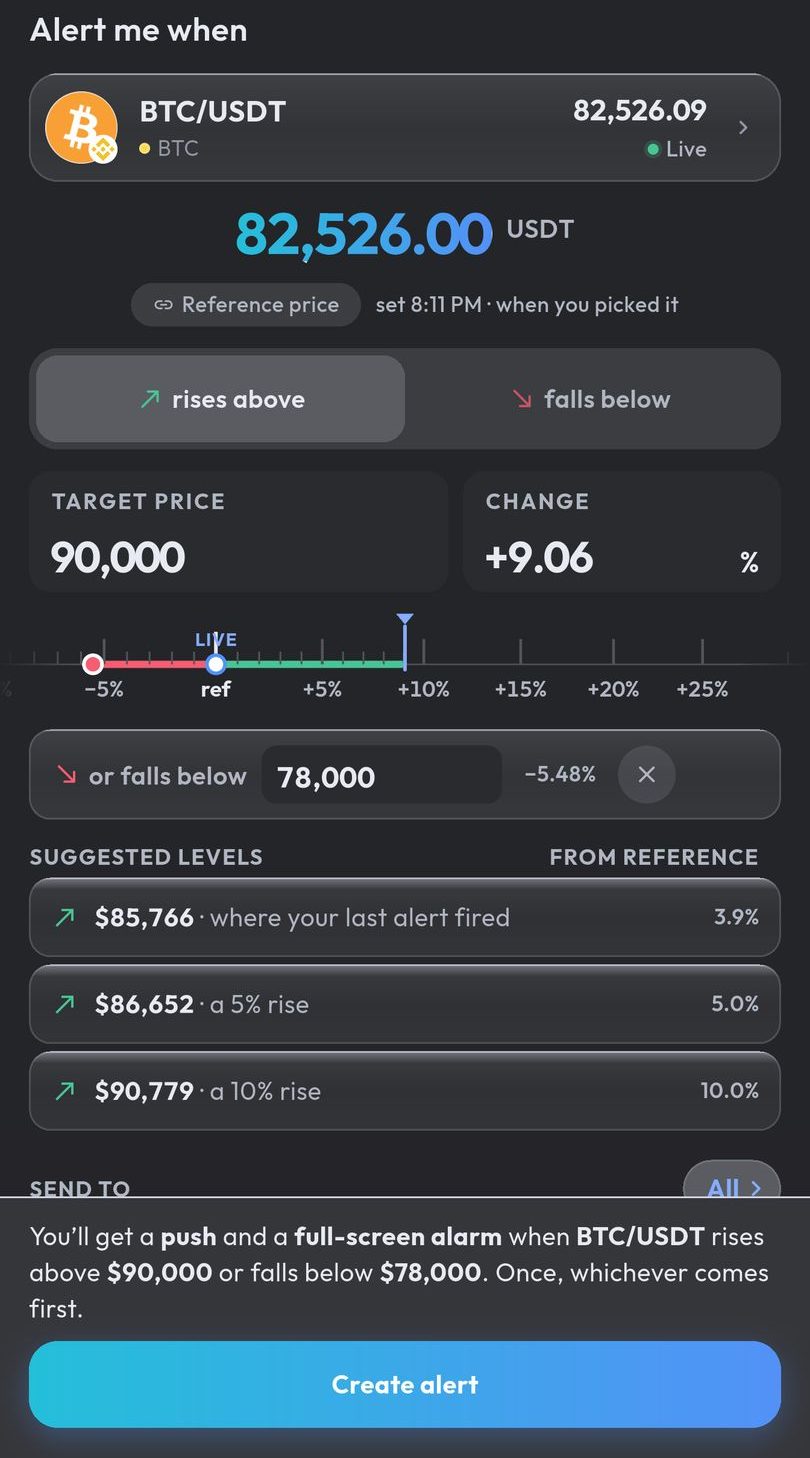
Our servers do the watching, so the alert fires with the app closed. Binance’s own alerts fit better for a 24-hour change, for a notification that opens Binance’s trading page, or on an iPhone. Our app watches spot pairs only, with no futures alerts, and it is Android only for now; an iPhone version is in development.
Android only for now. An iPhone version is in development.
Common questions
How do I set a price alert on Binance?
In the Binance app, tap Markets, search the pair, tap the Alert icon at the bottom left, choose an alert type, enter the price and frequency, and tap Create Alert. Binance says alerts are only available on Binance Pro, so switch modes first if the icon is missing.
Why are my Binance price alerts not working?
Check that Android allows the Binance app’s notifications, that the Price Alert switch in the app’s notification preferences is on, and that the alert is still listed on the pair. Binance’s settings FAQ says it cannot guarantee timely delivery of notifications.
How do I change the Binance price alert sound?
Binance’s price alert FAQ does not describe a sound setting. On Android, check the Binance app’s notification settings (Settings, then Notifications, then App notifications): some phones let you set each kind of notification to Alerting or Silent.
Can Binance send price alerts to Telegram?
Binance’s price alert FAQ describes notifications from its app and Desktop App and does not mention Telegram. Its official Telegram bot, the Binance Crypto Analysis Bot, answers commands such as /price, but none of the commands its FAQ lists sets an alert at a price you choose.
How do I turn off Binance’s automated price alerts?
Tap Messages, then Settings, then Price Alert, and switch off Automated Price Alert, as Binance’s FAQ describes.
Does Crypto Alerts & Alarms need my Binance account or an API key?
No. It reads Binance’s public prices, never connects to your Binance account, never asks for an API key and never places a trade.
Last updated: 28 October 2026. Binance changes its app from time to time. If anything here is out of date, email support@appsfromzero.com and we will correct it.