
Coinbase price alerts not working? What to check, and how to quiet the ones you never set
Coinbase’s own pages describe two kinds of price alert in its app: custom price alerts, which Coinbase announced on 8 October 2024, and automatic alerts on large price swings, which its help page said in 2025 come only for coins on your watchlist. When an alert goes missing, check three things: that the coin is on your watchlist (the star), that Coinbase sends price alerts to your phone rather than only inside the app, and that Android lets the Coinbase app notify you.
Coinbase’s help centre blocked automated access when we checked on 28 October 2026. So the Coinbase quotes below come from Coinbase’s own pages as archived by the Wayback Machine, each with its date, and from Coinbase’s post on X. For the current steps, open its live help article on price alerts in your browser. Phone settings come from Google’s Android help, and menus differ by phone model and Android version.
Android only for now. An iPhone version is in development.
Coinbase’s two kinds of price alert
- Custom price alerts, the ones you set yourself. “Custom price alerts are now live on the @coinbase app,” Coinbase posted on X on 8 October 2024. For how to set one, the live help article linked above is the place to look; we could not read it.
- Automatic alerts, which Coinbase introduced in June 2019. Its blog post (archived 1 February 2026) said “you’ll receive price alerts for any cryptocurrencies on your Watchlist”, and that when prices “shift substantially up or down, you’ll receive an alert informing you of the percentage change”. Its help page, as archived on 2 October 2025, said they “notify you when there are large swings in price over short periods of time”.
The Coinbase Advanced section of Coinbase’s help centre, as archived on 27 May 2026, lists no article on price alerts.
The watchlist: what Coinbase’s own pages say
Coinbase’s help pages tie price alerts to the watchlist, at least in the copies we could read:
- Its Trade page help, archived 9 November 2025: “If you’re signed in, you can also select the Star icon to add an asset to your Watchlist”, and “if you choose, you can receive price alerts about each watched asset on iOS or Android with the Coinbase mobile app.”
- Its price alerts page, archived 2 October 2025: “Please note, you will only receive alerts for assets on your watchlist.”
The price alerts page was describing the automatic alerts, and neither copy mentions custom ones. We could not read whether the live article ties custom alerts to the watchlist too. Starring a coin takes a second, though, so it is the first thing to try when any Coinbase alert stays silent.
Alert set, nothing arrived: what to check, in order
- The star. Is the coin on your watchlist? See above.
- Coinbase’s own setting. The archived price alerts page (2 October 2025) put it under Settings › Notifications › Price Alerts, where “you can select to have alerts pushed to your phone or only alert you within the app”. In-app only means the alert waits inside Coinbase. That copy was about the automatic alerts and its menu names may have changed, so check the live article for where custom alerts are set.
- Android’s permission. Google’s Android help (checked 28 October 2026) puts it under Settings › Notifications › App notifications, then the app. Notifications can be off for the whole app or for one of its categories.
- A mode that silences the phone. Do Not Disturb, or a Bedtime mode that Google’s help says can turn on by schedule, only lets through the apps its notification filters allow. See Do Not Disturb exceptions for price alerts.
- Battery settings. Some phones hold apps back to save battery. The setting to change on each make of phone is in delayed notifications on Android.
A text message that claims to be a Coinbase alert is a different problem: how to tell whether an alert text is real.
Price notifications you never set: quieting the automatic ones
If the alerts you want gone are the automatic swing alerts, Coinbase’s archived help page (2 October 2025) points to the same Price Alerts screen under Settings › Notifications, where you could choose to keep them inside the app instead of on your phone. Because the same page said they come only for watchlist coins, unstarring a coin you no longer follow is the other lever. Switching off all of the Coinbase app’s notifications in Android works too, but that silences your custom alerts as well.
An alert on your Coinbase pair that rings like an alarm clock
Coinbase’s archived help page describes its alerts as notifications, pushed to the phone or kept in the app. If you need one that gets you out of bed, Crypto Alerts & Alarms can watch the same Coinbase pair and ring a full-screen alarm through silent mode on Android. It reads Coinbase’s public prices for pairs such as BTC/USD, ETH/EUR or SOL/GBP, with no Coinbase login, no API key and no watchlist to keep.
In the coin list, tap the Coinbase chip to narrow it to Coinbase pairs, search the coin and pick the pair. Choose a price for it to rise above or fall below, a level on each side, or a percentage move from the price as it stands. It always arrives as a push; decide whether it also rings as the full-screen alarm or goes to Telegram, and whether it fires once or keeps watching, with a cooldown of 5 minutes to a day between firings.
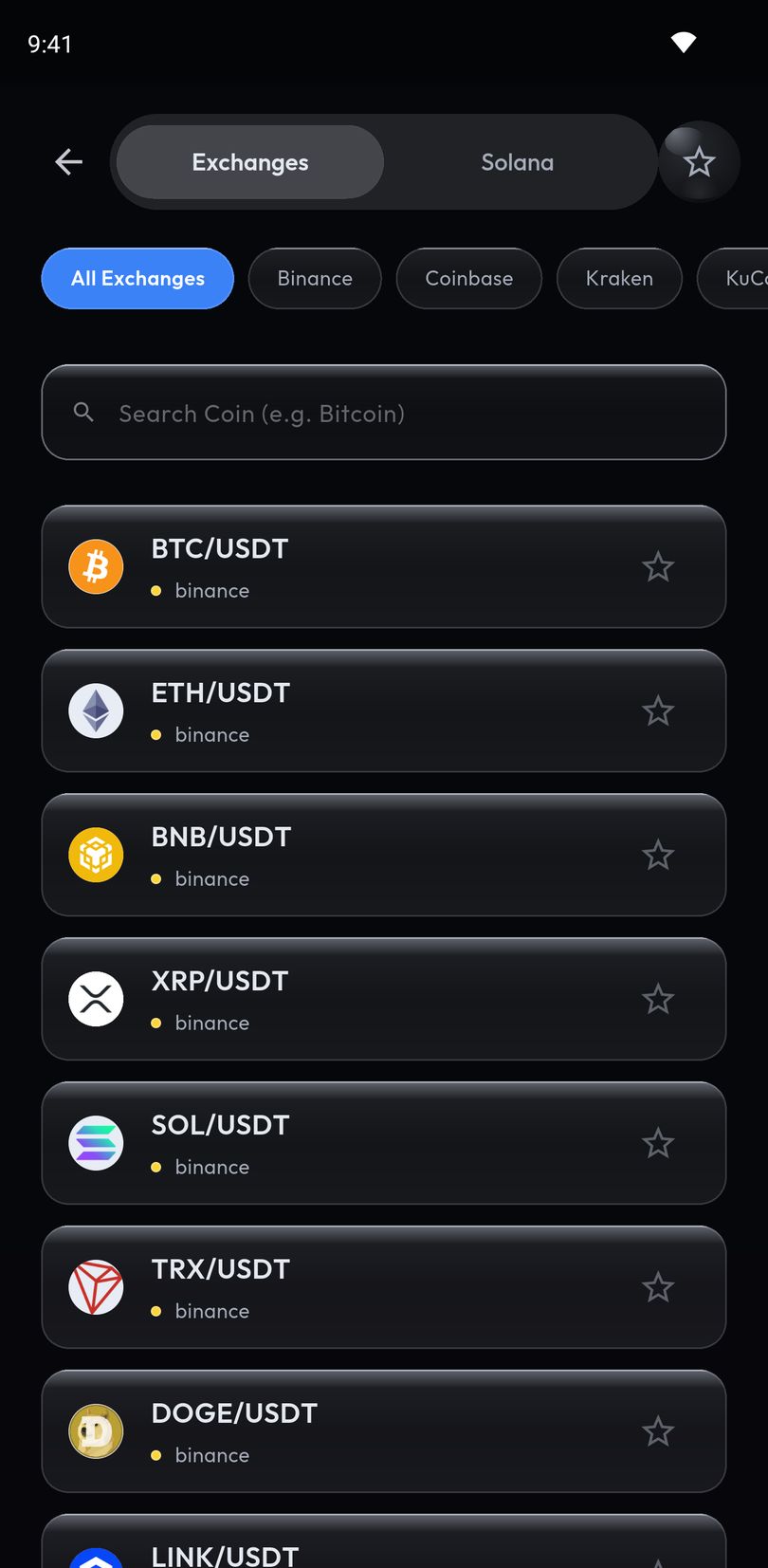
Alerts run on our servers, which is why they fire with the app shut. Before you rely on the alarm, the app reads the phone settings it can see (such as notifications, battery optimisation and, on Android 14 and later, the full-screen permission), flags any that need attention, and hides a check it cannot read rather than guessing.
Coinbase’s own alerts are the better fit if you want automatic warnings on big swings across your whole watchlist without setting any level, which our app does not do, or if you use an iPhone: Crypto Alerts & Alarms is Android only for now, and an iPhone version is in development. To make Coinbase’s own notification louder instead, see how to make a price alert ring like an alarm.
Android only for now. An iPhone version is in development.
Common questions
How do I set a price alert on Coinbase?
Coinbase announced custom price alerts in its app on 8 October 2024, and its help centre’s article on price alerts is the place for the current steps. Its help pages have also tied alerts to your watchlist, which you add a coin to with the star icon.
Why am I not getting Coinbase price alerts?
Check that the coin is on your watchlist, that Coinbase sends price alerts to your phone rather than only inside the app, and that Android allows notifications from the Coinbase app. In 2025, Coinbase’s help page said you only receive alerts for assets on your watchlist.
How do I turn off Coinbase price notifications?
Coinbase’s help page, archived on 2 October 2025, put its automatic price alerts under Settings, then Notifications, then Price Alerts, where you could keep them inside the app instead of on your phone. It also said they come only for coins on your watchlist.
Can a Coinbase price alert ring like an alarm?
Coinbase’s help page described its alerts as notifications pushed to your phone or shown inside the app. For an alert on a Coinbase pair that rings through silent mode on Android, Crypto Alerts & Alarms can watch the same pair and deliver it as a full-screen alarm.
Does Crypto Alerts & Alarms need my Coinbase account?
No. It reads Coinbase’s public prices for the pair you pick, never connects to your Coinbase account, never asks for an API key and never places a trade.
Last updated: 28 October 2026. Coinbase changes its app from time to time. If anything here is out of date, email support@appsfromzero.com and we will correct it.