
How to check a Solana token’s liquidity, holders and pool age
Look up the token’s mint address on DEX Screener, Jupiter or Solscan: DEX Screener’s data gives each pool’s liquidity and the time it was created, Jupiter’s token page adds up the quote side of its pools and counts holders, and Solscan lists each holder’s share of the supply. Low liquidity means one ordinary swap can move the price by several percent. Crypto Alerts & Alarms shows the same kind of numbers before you arm an alert, and flags thin liquidity, few holders and a new pool without showing a score or rating for the token.
Android only for now. An iPhone version is in development.
Liquidity in one minute: the pool behind the price
On Solana exchanges such as Raydium, Orca, Meteora and PumpSwap, a token’s price comes from a pool: two reserves side by side, such as the token in one and SOL or USDC in the other. A swap adds to one reserve and takes from the other, and the price moves to match the new balance. Liquidity is what the pool holds, usually given in dollars. The less it holds, the further each swap pushes the price.
Raydium’s documentation gives the rule for its AMM v4 and CPMM pools: the two reserves multiplied together stay
constant (coin_reserve × pc_reserve = k). PumpSwap’s pools are constant-product pools too.
Orca’s Whirlpools, Raydium’s concentrated pools and Meteora’s DLMM pools place liquidity in
price ranges instead, so a swap can move them more or less than the table below shows.
What a small pool does to the price, in one table
Arithmetic on that rule, not a measurement. One swap of SOL or USDC for the token raises the price by these amounts; the same swap the other way lowers it by less: about 3.9% where the table says 4%, and about 31% where it says 44%.
| The pool holds, both sides together | A $100 swap moves the price about | A $1,000 swap moves it about |
|---|---|---|
| $10,000 | 4% | 44% |
| $100,000 | 0.4% | 4% |
| $1,000,000 | 0.04% | 0.4% |
Two things decide how to read a liquidity figure against it:
- Which sides it counts. DEX Screener’s dollar figure for a pair covers both sides: on 24 Solana pairs we checked on 28 October 2026, it matched the two token amounts it reports, at its own prices, within 0.05%. Jupiter’s docs say its figure adds up the quote side of the token’s pairs with established tokens such as SOL and USDC, counting the token’s own side only when Jupiter considers it established. With one pool, $10,000 on Jupiter’s count means about $20,000 in all, where a $100 swap moves the price about 2%.
- Which pool. A token can trade in many pools, each with its own price. An alert follows one of them, so that pool’s liquidity is the one that matters.
Where to see a token’s liquidity, holders and age
Look the token up by its mint address, not its name: names and tickers get copied. How to find the right mint address.
| Tool | Liquidity | Holders | Age |
|---|---|---|---|
| DEX Screener (search by name, symbol, token address or pair address) | Each pair’s, in dollars and in each of its two tokens | Not in its documented pair data | When each pair was created |
| Jupiter (jup.ag/tokens/ followed by the mint address) | Added up across the token’s pairs with established tokens, on the quote side | Unique wallets holding it; the top 10 holders’ share | Time since the token was created on chain |
| Solscan (token page) | Total value locked in each market, with its DEX and pair | The number of holders, each one’s share of supply, and a chart of the top 10 to 100 | Not described |
| Birdeye | A liquidity figure, per its data documentation; its app listing shows stats across pools or for one pool | A holder count, per its data documentation | Not described |
| Crypto Alerts & Alarms (our app) | Jupiter’s figure, or a reading of the pool it follows | Jupiter’s count | A warning when the first pool is under 24 hours old |
Sources: DEX Screener’s token listing docs and API reference; Jupiter’s token page docs; Solscan’s token page docs; Birdeye’s Google Play listing and token overview docs. Solscan’s token page docs were last updated on 20 February 2023.
What the warnings on the app’s token card point out
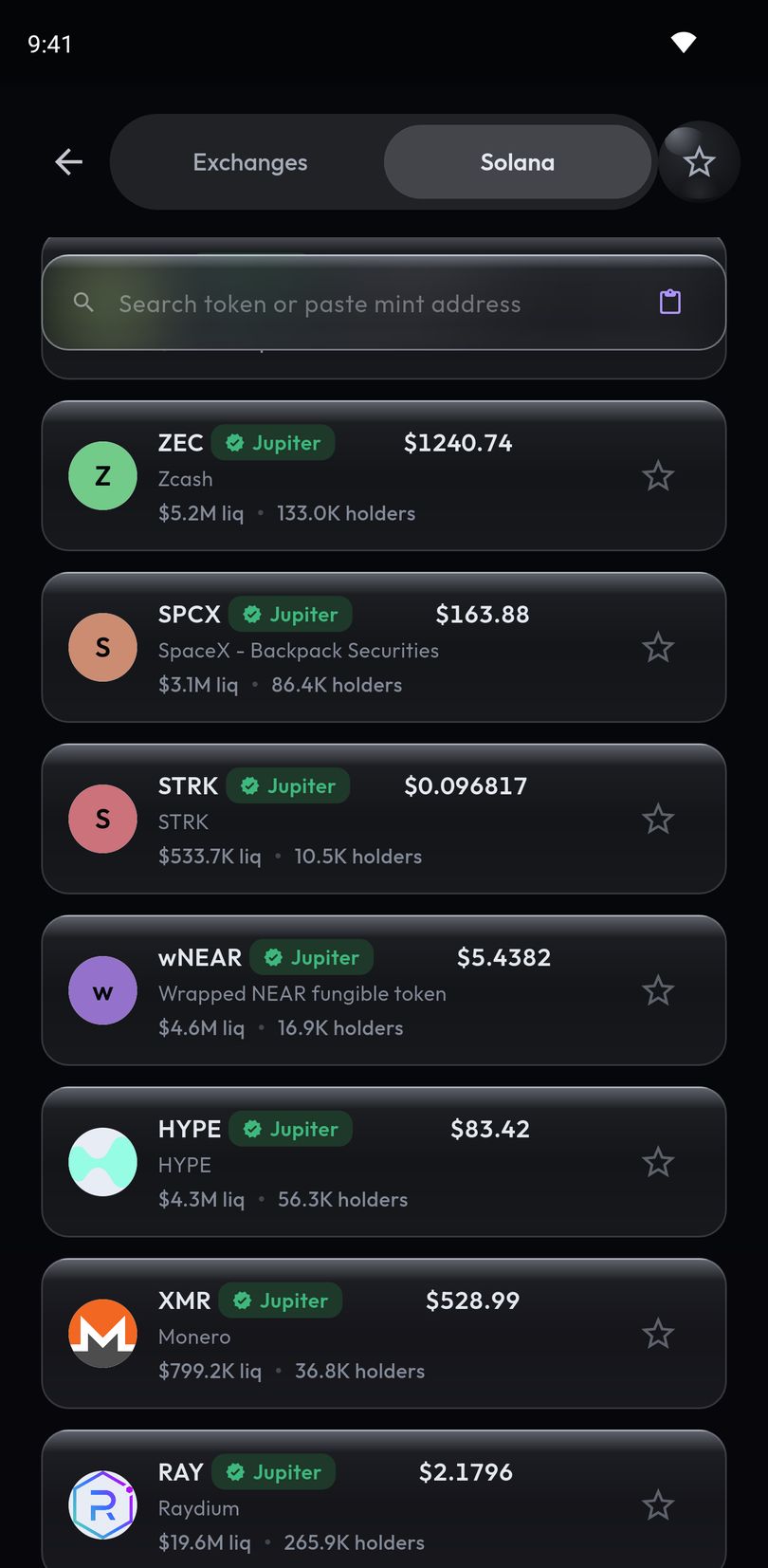
When you paste a mint address, Crypto Alerts & Alarms shows the token’s price and, where it has them, its liquidity, holders and 24-hour volume before you arm an alert. It warns about four things, with thresholds set on our servers:
| The card says | When | Where the number comes from |
|---|---|---|
| “$6.2K liquidity” | Liquidity is under $10,000 | Jupiter, or the pool the app follows (see below) |
| “Pool 4h old” | The token’s first pool opened less than 24 hours ago | Jupiter’s record of that first pool |
| “87 holders” | Fewer than 500 wallets hold it | Jupiter’s holder count |
| “Liquidity unknown” | There is no liquidity figure | Nothing to read |
A warning needs its number: where the app has no holder count or pool date from Jupiter, there is no warning about it. A liquidity label is rounded down, so a figure just under $10,000 never reads as $10K.
In search results the liquidity figure is normally Jupiter’s. On the card for a pasted mint address and on an alert, it is whichever reading came last: Jupiter’s, DEX Screener’s for the pool the app picked, or the app’s own reading of that pool’s reserves while an alert watches it, the last two counting both sides. So one token can show different figures in different places.
- In search results, a flagged token shows its worst warning in amber in place of its liquidity and holders line, one per row.
- When you paste a mint address, the card lists every warning, with the pool the app found and a Solscan link.
- On the alert form, the worst warning stays beside the token.
- On the alert in your list, it sits on the status line while the alert is watching, paused or waiting to re-arm.
- A token the app cannot price yet is dimmed; if it has no pool the app can track when you create the alert, the app says so instead of arming it.
The Jupiter mark
The one positive mark the app draws is Jupiter’s, always with Jupiter’s name: a tick and the word Jupiter on a list row, “Verified by Jupiter” on the card. Where Jupiter has not verified the token, the app draws nothing rather than calling it unverified. Jupiter’s verification docs say the check marks the canonical version of a token for its ticker, “is not an endorsement of the project or team by Jupiter” and “does not guarantee the token’s legitimacy, safety, or quality”.
No rating of its own
The app shows no score, no green bar and no overall rating for a token. Search results are ordered from Jupiter’s figures, such as holders, buyers, market cap and volume, but no score is shown. The note it shows when you first open its Solana tab says prices “come from a single liquidity pool, so thin pools swing hard”, and “We don’t vet tokens”. A token with no warning has not passed a test: none of the four conditions applied to the numbers the app had, and the card checks nothing else.
What these numbers cannot tell you
- Who still controls the token. Whether someone can create more of it (mint authority) or freeze holders’ accounts (freeze authority). The card shows neither; Jupiter’s token page lists both, and Solscan’s shows the mint authority.
- How concentrated the holders are. A token can have thousands of holders while a few wallets own most of it. Jupiter shows the top 10 holders’ share; Solscan has the holder list and a distribution chart.
- Whether the liquidity is locked. The card says nothing about locks. Raydium, for one, lets liquidity be locked for good with a feature it calls Burn & Earn, and its pool data reports the share of each pool locked that way.
- Whether they still hold tomorrow. Every figure is a reading at one moment, and liquidity can be withdrawn.
Alerts on a thin pool: why one trade can ring them
Crypto Alerts & Alarms prices a Solana token from its pool after every trade, and an alert fires when the price crosses your level between one reading and the next. In a $10,000 pool, one $100 swap moves the price about 4%, so an alert 3% away can ring on a single swap, even if the next swap undoes it. That is the alert doing its job, and why a level on a thin pool needs room:
- Set the level further out than on a deep pool. How big a percentage alert should be.
- For a level the price may hover around, let the alert fire once, or repeat with a longer cooldown; the app offers 5 minutes to a day.
- If the token also trades on Binance, Coinbase, Kraken, Bybit or KuCoin, an alert on that exchange pair follows the exchange’s price instead of one pool’s.
The app keeps checking the pool behind each alert. If it drains below the minimum the app needs, closes or stops trading, the app pauses its alerts and looks for another pool it can price; if there is none, the alert’s card says the pool closed. Setting the alert itself, step by step.
Android only for now. An iPhone version is in development.
Common questions
How do I check the liquidity of a Solana token?
Search its mint address on DEX Screener, whose data gives each pool’s liquidity in dollars and in each of its two tokens, or open its Jupiter token page, which adds up the quote side of its pools. In Crypto Alerts & Alarms, paste the mint address to see its liquidity, its holder count where the app has one, and the pool the app found.
How can I see how many holders a token has?
Solscan’s docs say its token page shows the number of holders and lists each holder’s share of the supply. Jupiter’s token page shows how many wallets hold the token and what share the top 10 hold.
What does low liquidity mean in crypto?
That the pool behind the price holds little, so one swap moves the price a lot. In a constant-product pool holding $10,000 in all, a $100 swap moves the price about 4% before fees; in a $100,000 pool, about 0.4%.
Does Crypto Alerts & Alarms rate tokens?
It shows no score or rating for any token. It warns about liquidity under $10,000, fewer than 500 holders, a first pool under 24 hours old and unknown liquidity, and draws Jupiter’s verification labelled as Jupiter’s. A token with no warning has not been checked for anything else.
Last updated: 28 October 2026. Other tools’ pages change. If anything here is out of date, email support@appsfromzero.com and we will correct it.