
How to set a price alert on DEX Screener, plus an alarm that wakes you
DEX Screener’s iPhone and Android apps list price alerts among their features, and its Telegram bot, DEX Screener Price Alerts Bot, offers “instant price alerts for any pair on DEX Screener”. Each pair has its own price, so find the exact pair by the token’s address first. DEX Screener’s docs and listings do not mention a sound that rings through silent mode; for that, Crypto Alerts & Alarms can watch the same Solana token and ring a full-screen alarm on Android.
We make Crypto Alerts & Alarms and are not affiliated with DEX Screener. Facts about DEX Screener and the other tools come from their own docs, store listings and bot pages, checked on 28 October 2026. DEX Screener’s help centre could not be reached, so one fact comes from its archived copy, dated. We have not used DEX Screener’s app for this page.
Android only for now. An iPhone version is in development.
How to set a price alert on DEX Screener
DEX Screener’s docs explain how to find a token or a pair, but none of its pages we could read walks through the alert screen itself, so these steps stop where its own pages stop:
- Search the token’s address. Its docs say the search bar finds “any particular token by its name, symbol or address, as well as a pair address”. Use the mint address: names and tickers are easy to copy.
- Open the pair you mean. A token can trade in several pairs, for example against SOL in one pool and USDC in another, each with its own price and liquidity. The bot describes its alerts as being for a pair.
- Set the alert in the app, or in Telegram. Price alerts are among the features its Android and iPhone listings name. In Telegram, its help centre named two official bots: DEX Screener Price Alerts Bot (@DSPriceAlertsBot) for individual users and DEX Screener Price Bot (@dspricebot) for groups, in a copy archived on 8 November 2024.
The listings do not say how an alert in the app reaches you, or whether it rings through silent mode or Do Not Disturb. If you need it to wake you, try one with a level close to the current price before relying on it.
Reading a DEX Screener pair page: the numbers an alert uses
A pair page is about one pool. DEX Screener’s API reference lists the data it keeps for every pair; these are the parts that matter for an alert, by the names its API uses:
| Data (API name) | What it tells you before you set an alert |
|---|---|
Pair address (pairAddress) | Which pool this is. The pair links in DEX Screener’s data end in it written in lower case, and Solana addresses are case-sensitive, so copy the address itself rather than lifting it from a link. |
Base token (baseToken) | The token whose price the pair shows, with its mint address: the address to paste into an alert app. |
Quote token (quoteToken) | What that price is counted in, such as SOL or USDC. |
Price (priceNative, priceUsd) | The price in the quote token and in dollars. Solana alerts in Crypto Alerts & Alarms are set in dollars. |
Liquidity (liquidity) | What the pool holds, in dollars and in each of its two tokens. The smaller it is, the further one swap moves the price, and the more easily an alert rings. |
Pair created (pairCreatedAt) | How old the pool is. |
FDV and market cap (fdv, marketCap) | Its docs give FDV as “(total supply - burned supply) * price”. For a token that does not burn the supply that is out of circulation, market cap uses a self-reported circulating supply where it finds one; in most cases the two are the same. |
Crypto Alerts & Alarms alerts on price, not market cap. While the supply stays the same, both move by the same percentage, so a market cap 50% higher is a price 50% higher, and a 50% rise alert covers it. What a pool’s liquidity does to its price.
DEX Screener, Birdeye or DEXTools: which ones send price alerts
All three say they do. The table quotes each one’s own listing or pages, checked 28 October 2026, and leaves out any channel that its pages tie to some accounts only.
| Tool | What its own pages say | How alerts reach you, per those pages |
|---|---|---|
| DEX Screener | Price alerts among the app’s key features; a bot with “instant price alerts for any pair on DEX Screener”; “60+ chains” | In its iPhone and Android apps (how is not stated); Telegram |
| Birdeye | “Get notified of price swings, whale moves, and key market activities so you can act instantly.” Solana, Ethereum, Sui, Base and other EVM chains | Notifications in its iPhone and Android apps (push, per its Google Play listing) |
| DEXTools | “Customize the price of the alert for each cryptocurrency and you will receive a notification when they reach the price you have selected” | A notification from its Android app |
| Crypto Alerts & Alarms (our app) | Price levels and percentage moves on Solana tokens by mint address, and on Binance, Coinbase, Kraken, Bybit and KuCoin pairs | Push, which can ring as a full-screen alarm through silent mode on Android; Telegram too |
None of those pages describes an alarm that rings through silent mode or covers the lock screen. They do describe what this app lacks: alerts on whale moves (Birdeye), and pairs on chains other than Solana, which this app’s on-chain alerts do not cover. For a pair on another chain, their alerts are the better choice, and so are DEX Screener’s or Birdeye’s on an iPhone: Crypto Alerts & Alarms is Android only for now, with an iPhone version in development. It sends no email, SMS, phone calls, Discord messages or webhooks either.
Axiom: its documentation describes alerts on wallets you track and a tweet monitor, and does not describe price alerts.
Sources: DEX Screener, Birdeye and DEXTools on Google Play; Birdeye on the App Store; DEX Screener’s bot page; Axiom’s tweet monitor docs.
The same token as an alarm in Crypto Alerts & Alarms
An alert here follows the token’s price in dollars, read from one pool the app picks, and it is checked on our servers, so it fires with the app closed.
- Copy the token’s mint address, not the pair address.
- In Crypto Alerts & Alarms, start a new alert, switch the coin picker from Exchanges to Solana, and paste the address into the search field.
- Read the card: the price, the liquidity, holders and 24-hour volume where the app has them, any warnings, and the pool the app will watch, shown by its DEX and the start and end of its address. If you pasted the pair address by mistake, the app says it is a pool address and offers the token that pool trades.
- Compare that pool with the pair you watched on DEX Screener. The app chooses the pool itself, among pools it can price on PumpSwap, Raydium, Orca and Meteora DLMM. If it chose another pair, the two prices can differ.
- Tap Use this token, then set a price, or a change from the current price.
- Every alert arrives as a push notification. Turn on the full-screen alarm, which rings through silent mode on Android, and add Telegram if you like.
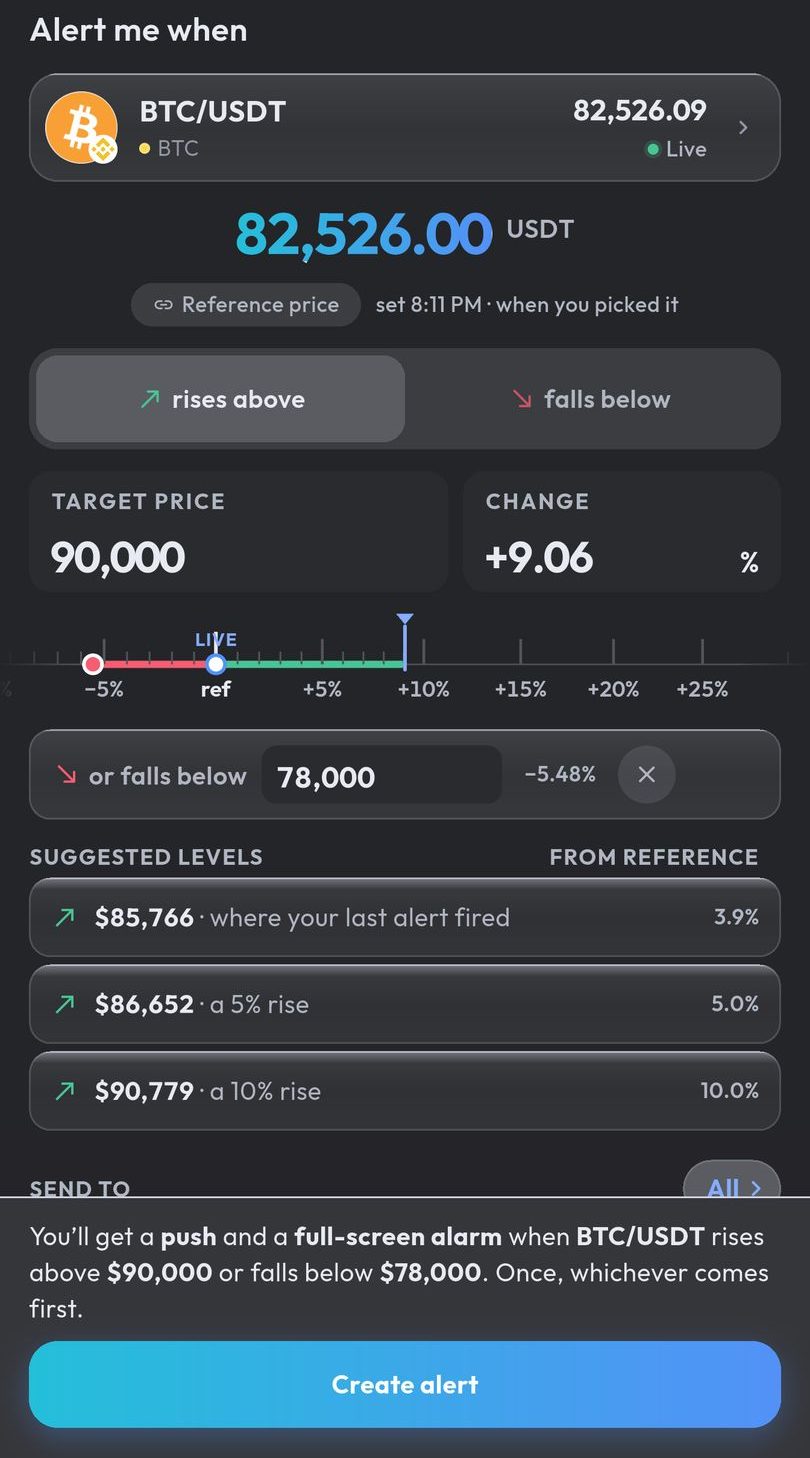
Before you rely on it overnight, see what the app’s alarm reliability check reports: it reads the phone settings an alarm depends on, such as the full-screen permission and battery optimisation, and opens the screens that change them. How the alarm works on Android.
Why the price differs between DEX Screener and an alert app
Expect a small gap, for three reasons:
- Last trade or mid-price. DEX Screener’s FAQ says its data comes from parsing raw blockchain logs. In our comparison on 28 October 2026, its price for each of three Raydium AMM v4 pools, which charge a 0.25% swap fee, matched that pool’s latest swap, fee included. Crypto Alerts & Alarms prices from the pool’s current state, its mid-price, with no fee. On one pool DEX Screener sat 0.24% above the mid-price after a swap of SOL for the token, and on another 0.25% below it after a swap the other way. On the third, the latest swaps were tiny, a single token each, and DEX Screener sat 3.3% below.
- The dollar rate. The app turns a SOL price into dollars with Binance’s SOL/USDT price and counts USDC and USDT as a dollar each; DEX Screener’s dollar figure comes from its own conversion.
- A different pool. The app follows one pool per token, while DEX Screener lists every pair, and a thin pair can sit well away from the others.
Your alert fires on the app’s own price, read after every trade on the pool it follows. Leave room for these gaps when you set a level within a fraction of a percent of the price DEX Screener shows.
Android only for now. An iPhone version is in development.
Common questions
Does DEX Screener have price alerts?
Yes. Its iPhone and Android apps list price alerts among their features, and its Telegram bot, DEX Screener Price Alerts Bot, describes itself as offering “instant price alerts for any pair on DEX Screener”.
Can a DEX Screener alert ring like an alarm?
Its store listings and docs do not mention an alarm sound, silent mode or a full-screen alert. Crypto Alerts & Alarms can watch the same Solana token, once it has a pool on PumpSwap, Raydium, Orca or Meteora DLMM, and ring a full-screen alarm through silent mode on Android.
Is there a DEX Screener Telegram bot for price alerts?
Yes. DEX Screener’s help centre named two official bots: DEX Screener Price Alerts Bot for individual users and DEX Screener Price Bot for groups (archived copy of 8 November 2024).
Why is the price on DEX Screener different from my alert app?
In our comparison of three Raydium pools on 28 October 2026, DEX Screener’s price matched each pool’s latest swap, fee included, while Crypto Alerts & Alarms prices from the pool’s mid-price, with no fee. On two of the pools that left a gap of about 0.25% either way, the size of Raydium’s swap fee, and on one whose latest swaps were tiny, a gap of 3.3%. A different pool or dollar rate can add to the gap.
Can I paste a DEX Screener pair address into Crypto Alerts & Alarms?
Yes. The app recognises a pool address and offers the token that pool trades. The alert then follows the pool the app picks for that token, which may be a different pair.
Last updated: 28 October 2026. Listings and docs change. If anything here is out of date, email support@appsfromzero.com and we will correct it.