
Alarm Crypto and Crypto Alerts & Alarms: two Android price alarms, compared
Alarm Crypto and Crypto Alerts & Alarms are two separate apps that make a crypto price alert ring like an alarm clock on Android, even when the phone is on silent. Alarm Crypto also runs on Windows, covers Bitget and MEXC, and can ring on the Fear & Greed and Altcoin Season indexes. Crypto Alerts & Alarms covers KuCoin, can also send an alert to Telegram, and alerts on any Solana token by mint address once it has a live pool.
We make Crypto Alerts & Alarms (getcryptoalert.com). We are not affiliated with Alarm Crypto (alarmcrypto.app), which Google Play lists under the developer name Contrl APP: the names are close, the apps are not the same. Everything said about Alarm Crypto here is quoted or closely paraphrased from its own website, llms.txt file, Google Play listing and Microsoft Store listing, checked on 28 October 2026. We have not run the two apps side by side on a phone.
Android only for now. An iPhone version is in development.
What each app says it does
Alarm Crypto’s homepage says: “Pick a coin and a price. When the market gets there, your phone rings like an alarm clock, even on silent and with the app closed.” Its FAQ adds that prices are watched on its servers. Crypto Alerts & Alarms also checks prices on its own servers, so alerts fire with the app closed. Each alert arrives as a push notification or as a full-screen alarm that wakes the screen and rings through silent mode, and it can go to Telegram too. An alert can fire once, or repeat after a cooldown you choose, from 5 minutes to a day.
Alarm Crypto and Crypto Alerts & Alarms side by side
| Alarm Crypto | Crypto Alerts & Alarms | |
|---|---|---|
| Runs on | Android and Windows (Microsoft Store). Its FAQ says there is no iPhone version yet | Android. An iPhone version is in development |
| What wakes you | The “native Android alarm channel”, which “bypasses silent mode”; volume and tone set in the app | A full-screen alarm over the lock screen that rings through silent mode, with five tones, your volume and a timeout |
| Do Not Disturb | Its About page says the alarm sound plays “even in ‘Do Not Disturb’ mode” | Sent as an alarm, so it is built to ring when Do Not Disturb allows alarms. An optional checklist row, “Ring in Do Not Disturb”, opens Android’s Do Not Disturb access screen |
| Other ways an alert reaches you | A push notification; its Windows app “keeps ringing from the tray”. Telegram delivery: not mentioned | A push notification, plus a Telegram message if you connect Telegram |
| Exchanges | Binance, Coinbase, Kraken, Bybit, Bitget and MEXC | Binance, Coinbase, Kraken, Bybit and KuCoin |
| Coins | “More than 5,000 coins” on its website; “2,000+ cryptos” on its Play listing | Over 1,200 coins in over 5,000 exchange pairs; you choose the pair |
| DEX and Solana tokens | Its pages point both ways (see below) | Any Solana token by name or mint address, once it has a live pool with enough liquidity on PumpSwap, Raydium, Orca or Meteora DLMM |
| Alarms beyond price | Fear & Greed index, Altcoin Season index and NFT collection floors | None: price levels and percentage moves only |
| Setting the level | A target and a condition, above or below; shortcuts from -10% to +10% set it from the current price | Above, below, or both sides in one alert; an exact price or a percentage move from the current price |
| Languages | Website and Play listing in English and Portuguese. Its guide says the alarm text “follows the language you picked in settings” | App in English, Spanish, Portuguese, French, Filipino, Vietnamese and Thai. Notification text is in English |
Sources: Alarm Crypto’s homepage, FAQ, About page (updated 10 October 2026), how-to guide (updated 27 July 2026), llms.txt (updated 10 October 2026), Google Play listing (updated 12 October 2026) and Microsoft Store listing, all checked 28 October 2026.
DEX and Solana tokens: Alarm Crypto’s pages say two things
On tokens that trade only on decentralised exchanges, Alarm Crypto’s own pages point both ways, so we quote both. Its homepage, as served on 28 October 2026, offers alarms “on tokens that just launched” and a Trenches section of “the tokens with the most volume on Ethereum, Base, Solana and other networks”, where you can “set the alarm right there”.
Its About page and its llms.txt (the summary it publishes for AI assistants), both last updated on 10 October 2026, say it does not cover them: “DEX-only tokens are not covered”, and in Portuguese, “Tokens listados apenas em DEXs: sem cobertura” (tokens listed only on DEXs: no coverage). Its guide to phone alerts, updated in April 2026, says the same. The “What’s new” note on its Play listing (updated 12 October 2026) points the other way: in Portuguese, it says shared alarms on NFTs and on “tokens da Trincheira” (Trenches tokens) now come with an image. Its pages do not say which is current, so if a DEX token is why you want the alarm, check it in the app before you rely on it.
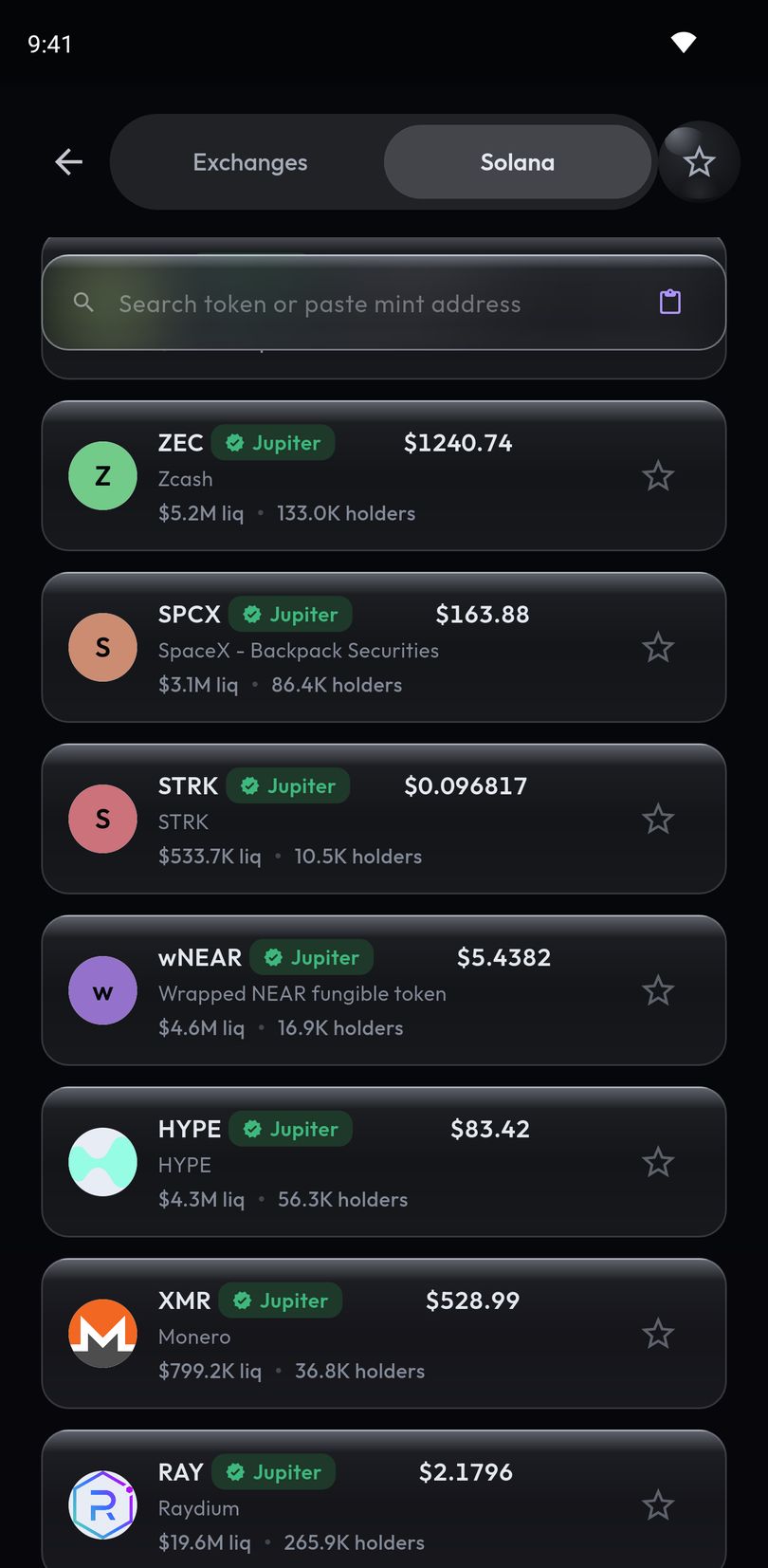
Crypto Alerts & Alarms reads prices from Solana pools on-chain. Search a token by name and each result shows its price with its liquidity and holders, or a plain reason for a warning, such as low liquidity or a pool opened a few hours ago. Paste its mint address and, before you arm anything, the app shows its price, its liquidity, holders and volume where it has them, and its pool, with a Solscan link. The token needs a live pool on PumpSwap, Raydium, Orca or Meteora DLMM with enough liquidity. Tokens that trade only on Ethereum, Base or another network are not covered unless one of the five exchanges lists them. More in setting an alert on any Solana token.
Exchanges, and which price an alert follows
Besides covering different exchanges, the two apps differ on which exchange an alert listens to. Alarm Crypto’s guide says the app “monitors 6 exchanges simultaneously” and argues that “an alert tied to a single order book arrives late”; its pages do not say which exchange’s price decides a given alarm. In Crypto Alerts & Alarms you pick the market, such as BTC/USDT on Binance or BTC/USD on Coinbase, and the alert follows that pair’s own price. One coin rarely trades at exactly the same price everywhere (see why the Bitcoin price differs between exchanges), so a level can be crossed on one market and not on another.
What wakes you, and what can stop it
Both apps say their alarm rings the way an alarm clock does, which is how each gets through silent mode. Alarm Crypto’s guide describes picking a sound and volume for each alarm, and quiet hours, a window in which low-priority alarms don’t wake you. The Crypto Alerts & Alarms alarm turns the display on over the lock screen and plays one of five tones until you press Stop or its timeout runs out.
Battery savers and some makers’ autostart switches can still hold an alert back. Alarm Crypto’s FAQ lists three things to check: battery optimization, autostart on Samsung, Xiaomi and Huawei phones, and notifications. Its phone-alerts guide adds that the app has “a dedicated flow that detects your manufacturer and takes you straight to the right settings screen”. Crypto Alerts & Alarms has a built-in checklist that reads the notification, full-screen, battery and Do Not Disturb access settings, with a button to fix each one; for autostart, which Android gives apps no standard way to read, it says it can’t check and asks you to confirm. Phone settings are covered in the crypto price alarm guide.
Where Alarm Crypto is the better choice
- Windows. Its Windows app “keeps ringing from the tray” after you close the window. Ours is Android only for now.
- Market-mood alarms on the Fear & Greed and Altcoin Season indexes, which Crypto Alerts & Alarms does not have.
- Coins on Bitget or MEXC that none of our five exchanges lists.
- NFT floors. Its homepage offers alarms on collection floor prices, naming Pudgy Penguins.
- Home-screen widgets on Android; ours has none.
- Alarm text in your language. Its guide says the text follows the app’s language setting. Our notification text is in English, though the app itself is in seven languages.
- Quiet hours, and sharing alarms with someone else through an 8-character code.
- Tokens on Ethereum, Base and other networks, if its homepage’s Trenches section is the current word (see above).
Where Crypto Alerts & Alarms fits better
- Solana tokens no exchange lists, by name or mint address, with liquidity and holders, or a plain warning, shown before you arm the alert.
- Telegram delivery alongside the phone. Alarm Crypto’s pages do not mention it.
- The exact market you watch, KuCoin pairs included.
- Both directions in one alert. Alarm Crypto’s FAQ describes one condition per alarm, above or below.
You can also set the same level in both apps for a few days and keep the one that wakes you.
Android only for now. An iPhone version is in development.
Common questions
What is a cryptocurrency alarm app?
An app that watches a coin’s price and plays a loud alarm, not just a notification, when the price crosses your level. Alarm Crypto and Crypto Alerts & Alarms both do this on Android, even on silent.
Is Alarm Crypto the same app as Crypto Alerts & Alarms?
No. Alarm Crypto (alarmcrypto.app) is listed on Google Play by Contrl APP, and Crypto Alerts & Alarms (getcryptoalert.com) is made by Apps From Zero.
Does Alarm Crypto ring when the phone is on silent?
Its FAQ says yes: it uses “the native Android alarm channel, which bypasses silent mode just like an alarm clock.” The full-screen alarm in Crypto Alerts & Alarms rings through silent mode too.
Can Alarm Crypto alert on DEX or Solana tokens?
Its own pages point both ways: its homepage offers alarms on the tokens with the most volume on Ethereum, Base, Solana and other networks, while its About page and llms.txt say DEX-only tokens are not covered. Crypto Alerts & Alarms alerts on any Solana token by name or mint address once it has a live pool with enough liquidity on PumpSwap, Raydium, Orca or Meteora DLMM.
Is there an Alarm Crypto app for iPhone?
Not yet, says its FAQ; it runs on Android and Windows. Crypto Alerts & Alarms is Android only for now; an iPhone version is in development.
Last updated: 28 October 2026. Listings and websites change. If anything here is out of date, email support@appsfromzero.com and we will correct it.