
Bybit price alerts: how to set them, and what to check when one never arrives
In the Bybit app, a price alert is set from the chart page of the pair you want to watch: tap the Alerts icon in the top right corner, set the level By Price or By Price Change (%), and choose how often it alerts you: Every 5 minutes, Alert Once Only or Repeated Alerts. If an alert never arrived, check first that your phone allows notifications from the Bybit app, then look under All Alerts to see whether it is still set.
Every Bybit step and label on this page comes from Bybit’s own help centre, mainly its article How to Manage Your Trade Settings (updated 19 October 2026), checked 28 October 2026. We make Crypto Alerts & Alarms, an Android app that can watch the same Bybit pair, and we are not affiliated with Bybit.
Android only for now. An iPhone version is in development.
How to set a price alert in the Bybit app
- Check that your phone allows notifications from the Bybit app, in the phone’s own settings. Bybit gives this as the first step to receiving its alerts.
- Open the chart page of the trading pair you want to watch.
- Tap the Alerts icon in the top right corner of the page.
- Enable the Price Alerts setting, then set the level By Price, or By Price Change (%), up or down.
- Choose the frequency: Every 5 minutes, Alert Once Only or Repeated Alerts.
- Tap All Alerts, also in the top right corner, to see your current and past alerts.
Bybit says the alert notifies you when the pair’s Last Traded Price moves higher or lower than the level you set, and that you can set several price alerts with different settings on the same pair. The article’s section for the website covers trading settings only, not price alerts.
Price or percentage, once or repeating: the options
| Setting | What Bybit’s help centre says |
|---|---|
| By Price | You get a notification when the Last Traded Price moves higher or lower than the level you set. |
| By Price Change (%) | The level is a percentage change, “in both directions”. |
| Alert Once Only | One of three frequencies. As the name says, it alerts you once. |
| Repeated Alerts | One of three frequencies. The page does not say how far apart the repeats come. |
| Every 5 minutes | One of three frequencies. The page gives no further detail. |
Bybit’s page does not say what a percentage alert is measured from, or how Every 5 minutes differs from Repeated Alerts. If a level matters to you only once, Alert Once Only is the plain choice.
Other Bybit alerts, for perpetual contracts
The same article lists three more alerts, all for USDT or Inverse perpetual contracts rather than spot pairs:
- Price Spike / Plunge: a notification when the contract price changes by more than a chosen percentage within 5 minutes.
- Open Interest: a notification when the number of outstanding contracts changes by more than a chosen percentage within a set period.
- Funding Fee Reminder: a notification about the predicted funding rate 30 minutes before each funding settlement. Bybit notes that it stays on, even when you hold no position, until you switch it off.
For these, Bybit’s own app is the right tool. Crypto Alerts & Alarms watches spot prices only and has no futures, open interest or funding alerts.
A Bybit alert never arrived: what to check
- The phone’s permission. Bybit’s first condition is that the phone allows notifications from the Bybit app. Menus differ by phone model and Android version; our checklist for alerts that do not arrive on Android goes through the settings in order.
- Bybit’s own notification settings. Open them from the bell icon, then the settings icon in the top right corner. Bybit’s account settings FAQ (last updated November 2025) gives another route: your profile icon, the Settings icon, then Preference and Notification Settings, where each type of alert has its own switch. A type switched off there does not reach your phone.
- Whether the alert is still set. All Alerts lists current and past alerts. An alert on Alert Once Only that already fired, perhaps while the phone was face down, has used its one alert: set a new one.
- Which price it follows. The alert goes by the Last Traded Price of the pair it is set on. A level you saw touched on another chart, such as the perpetual contract when your alert is on the spot pair, or on another exchange, may never have traded on that pair. Why the price differs between exchanges.
- No sound. Bybit’s Trading Preferences have a Notification setting where, Bybit says, you can enable notification sounds: on a pair’s Trade tab, tap the three-dot icon in the top right corner, then Trading Preferences. On a phone set to silent, an ordinary notification makes no sound at all.
- Battery saving and Do Not Disturb. Either can hold back or silence a notification from any app. See delayed notifications on Android and Do Not Disturb exceptions.
Bybit price alerts and TradingView alerts are different things
Bybit’s help centre also describes TradingView alerts sent to Bybit (updated 14 September 2026). Those are created in TradingView, not in Bybit: you copy a Bybit webhook URL, from TradingView Alert at the top right of a Bybit chart or under Account & Security, and paste it into the alert in TradingView. The Bybit app then shows each triggered alert as a push notification.
Bybit’s article lists what this needs on the TradingView side, plus a message template to paste; without the template, alerts can land in an Unknown tab. It also warns against sharing the webhook URL, as that may let false or scam messages reach you. A plain alert at a price on a Bybit pair needs none of this: the built-in price alert above does it. If your levels live in TradingView, see a TradingView alerts alternative for price levels.
When a Bybit alert has to wake you
The Bybit help pages quoted here describe its alerts as mobile push notifications. They say nothing about an alert that rings through silent mode, and a push notification on a silenced phone stays quiet.
Crypto Alerts & Alarms is an Android app that can watch the same Bybit spot pair, for example BTC/USDT, SOL/USDT or BTC/EUR, from our servers, so nothing has to stay open on your phone. Like Bybit’s own alert, it goes by the pair’s last traded price, read from Bybit’s public market data. When your level is crossed it can ring a full-screen alarm over the lock screen, even on silent, send a push notification, or post to a Telegram chat. It never asks for Bybit API keys and cannot place an order.
- Install the app, start a new alert and tap the Bybit chip at the top of the coin list.
- Search the coin and pick the Bybit pair.
- Choose “rises above” or “falls below” and type a target price or a percentage. Add the other side if either direction matters.
- Under “Send to”, the push is always on: add the alarm, Telegram or both. Then choose “Once, then switch off” or “Every time”, with a pause of 5 minutes to 24 hours between firings.
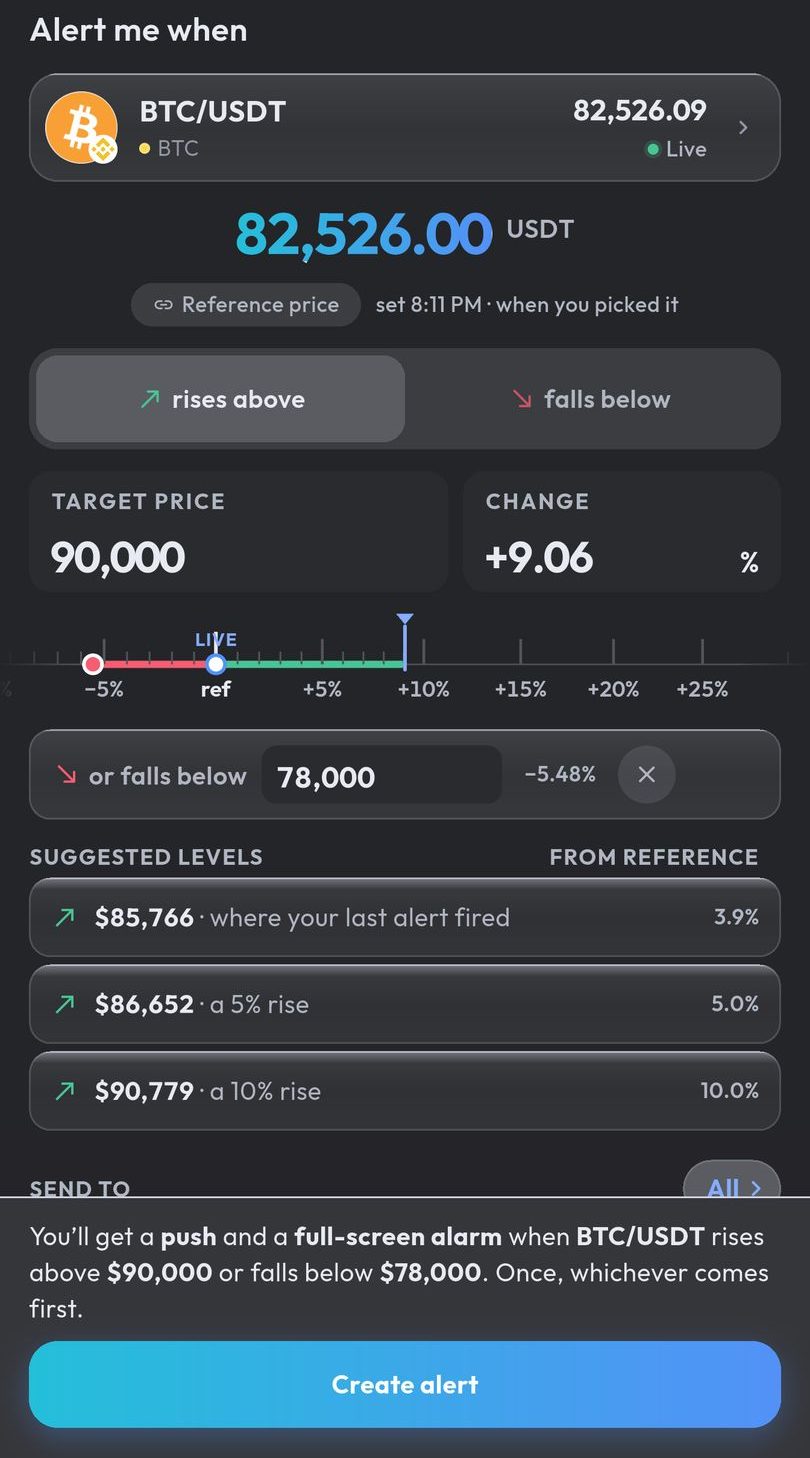
A percentage alert here is fixed when you create it: the percentage becomes a price level, measured from the reference price shown in the form, and that level does not move with the market. More on how the alarm rings through silent mode, and the settings it needs.
Android only for now. An iPhone version is in development.
Common questions
How do I set a price alert on Bybit?
In the Bybit app, open the chart page of the pair, tap the Alerts icon in the top right corner and set a price alert By Price or By Price Change (%). Then choose how often it alerts you: Every 5 minutes, Alert Once Only or Repeated Alerts.
Why are my Bybit price alerts not working?
Start with your phone: Bybit says it must allow notifications from the Bybit app. Then check Bybit’s own notification settings (the bell icon, then the settings icon), and look under All Alerts in case an Alert Once Only alert has already fired.
Can Bybit alert me when the price moves by a percentage?
Yes. Bybit’s help centre lists By Price Change (%) as one of the two ways to set a price alert, in either direction.
Can a Bybit price alert ring like an alarm?
The Bybit help pages we read describe its alerts as push notifications and do not mention an alarm mode. Crypto Alerts & Alarms can watch the same Bybit spot pair and ring a full-screen alarm through silent mode on Android.
Are Bybit price alerts the same as TradingView alerts?
No. A Bybit price alert is set in the Bybit app. A TradingView alert is created in TradingView with a webhook URL that Bybit gives you, and the Bybit app then shows it as a push notification.
Last updated: 28 October 2026. Bybit updates its app and help centre often. If anything here is out of date, email support@appsfromzero.com and we will correct it.