
Phantom wallet notifications and price alerts
Phantom sends push notifications about social activity, balance and trading updates, market insights and news, and you choose which ones in Settings > Preferences > Notifications. Neither its help centre nor its Google Play listing describes a price alert that you set on a token. To be told when a Solana token in your Phantom wallet reaches a price you pick, copy its mint address from Phantom into a price alert app such as Crypto Alerts & Alarms, which watches tokens with enough liquidity on PumpSwap, Raydium, Orca or Meteora DLMM and can ring a full-screen alarm on Android.
We make Crypto Alerts & Alarms and are not affiliated with Phantom. Everything this page says about Phantom comes from Phantom’s own help centre and Google Play listing, read on 28 October 2026 and linked where it is used. We have not tried these Phantom settings on a phone.
Android only for now. An iPhone version is in development.
What Phantom notifies you about
Phantom’s help article Manage notifications in Phantom, last edited on 5 October 2026, says the app “sends push notifications on iOS and Android about social activity, balance and trading updates, market insights, and news from Phantom.” Phantom may also email you about your account and activity.
- Social activity.
- Balance and trading updates.
- Market insights. The article does not say what these contain.
- News from Phantom.
- Tracked wallets on Phantom Terminal, its desktop web app, which can notify you when a wallet you track makes a trade, with a setting to show those notifications and play a sound.
Some of your actions switch notifications on automatically: in Phantom’s words, “following someone enables notifications about their trades.” Phantom does not describe any of them as an alert at a price you choose.
To choose what you receive, Phantom’s steps are:
- Tap your profile avatar in the upper left.
- Go to Settings > Preferences > Notifications.
- Choose which notifications to receive. Turning off Allow Notifications mutes everything, and each type has its own switch.
Phantom notifications not arriving? What to check
- Phantom’s own switches. In Settings > Preferences > Notifications, Allow Notifications has to be on, and so does the type you are waiting for.
- Your phone’s permission for Phantom. Phantom’s article points out that its notifications can also be turned off “in your phone’s system settings”. Check that Android allows them for Phantom.
- Battery saving and Do Not Disturb. Google’s Pixel help (checked 28 October 2026) says Battery Saver and Adaptive Battery “can stop or delay some alerts to save power”, and that Do Not Disturb “silences most notifications”. The menus differ by phone maker and Android version. Our Android checklist goes through them.
- What you have set up. Some notifications depend on it: Phantom notifies you of trades made by people you follow, and Terminal of trades by wallets you track. According to Phantom’s profile help, the bell icon on someone’s profile turns theirs off.
Does Phantom have price alerts?
Its own pages do not describe any. On 28 October 2026 we searched all 193 articles listed in the sitemap of Phantom’s help centre, and none mentions price alerts. Neither its notifications article nor its Google Play listing (updated 28 October 2026) describes an alert that fires when a token reaches a price, or moves by a percentage, that you set.
On Phantom Terminal you can Follow a token, which adds it to a Follows tab; Phantom does not describe that as an alert either. For a level of your own, use another app: the one thing it needs from Phantom is the token’s mint address.
How to copy a token’s mint address in Phantom
Phantom calls it the contract address, and adds: “On Solana, this is called a mint address.” Its steps, from the help article Check a token’s contract address before you interact with it:
- Search for the token and open its page. On mobile, the search field is at the bottom of Home.
- Scroll to About, followed by the token’s name, on mobile, or to Info in the browser extension.
- Find the Contract address or Mint field and copy the address.
Phantom also tells you to compare the address with the one the project publishes through its official sources. Two tokens can share a name, a ticker and a logo, but never a mint address. How to tell the real token from a copy.
Token shows no price in your wallet: why, and where to see it
Phantom’s article Why a token doesn’t show a price in Phantom, last edited on 25 August 2026, says Phantom “may not be able to retrieve market data” for such a token, and that you may see messages such as “Price history unavailable for this token”. It gives three causes:
- Little or no liquidity: “A token can exist onchain but still have no active market.”
- Not widely tracked: Phantom shows prices for tokens on data sources such as CoinGecko or Birdeye “that meet minimum market data requirements”, so a token that is “too new, too small, or not widely tracked yet” may have none.
- Spam or fake: some tokens are sent to wallets without permission and imitate real ones.
Trust Wallet takes its prices from CoinMarketCap instead, with conditions of its own: why a token shows no price in Trust Wallet.
Where to see a price anyway. If the token trades in a pool with real liquidity, that pool has a price even when your wallet shows none. Phantom’s own help suggests tools such as DEX Screener and Birdeye for researching a token’s liquidity and trading activity: paste the mint address there. In Crypto Alerts & Alarms, paste it into the Solana search. When the token has a live pool on PumpSwap, Raydium, Orca or Meteora DLMM with enough liquidity, its card shows the price, the liquidity and the pool.
No app can show a meaningful price for a token with no market, and ours does not pretend to. It sets alerts only on tokens with a pool it can read that holds enough liquidity, and it tells you when a token has none. If a token turned up in your wallet without you doing anything, Phantom’s advice is to treat it as suspicious and to avoid any links or claim instructions that come with it.
Set a price alert or an alarm on that token
- Install Crypto Alerts & Alarms from Google Play and start a new alert.
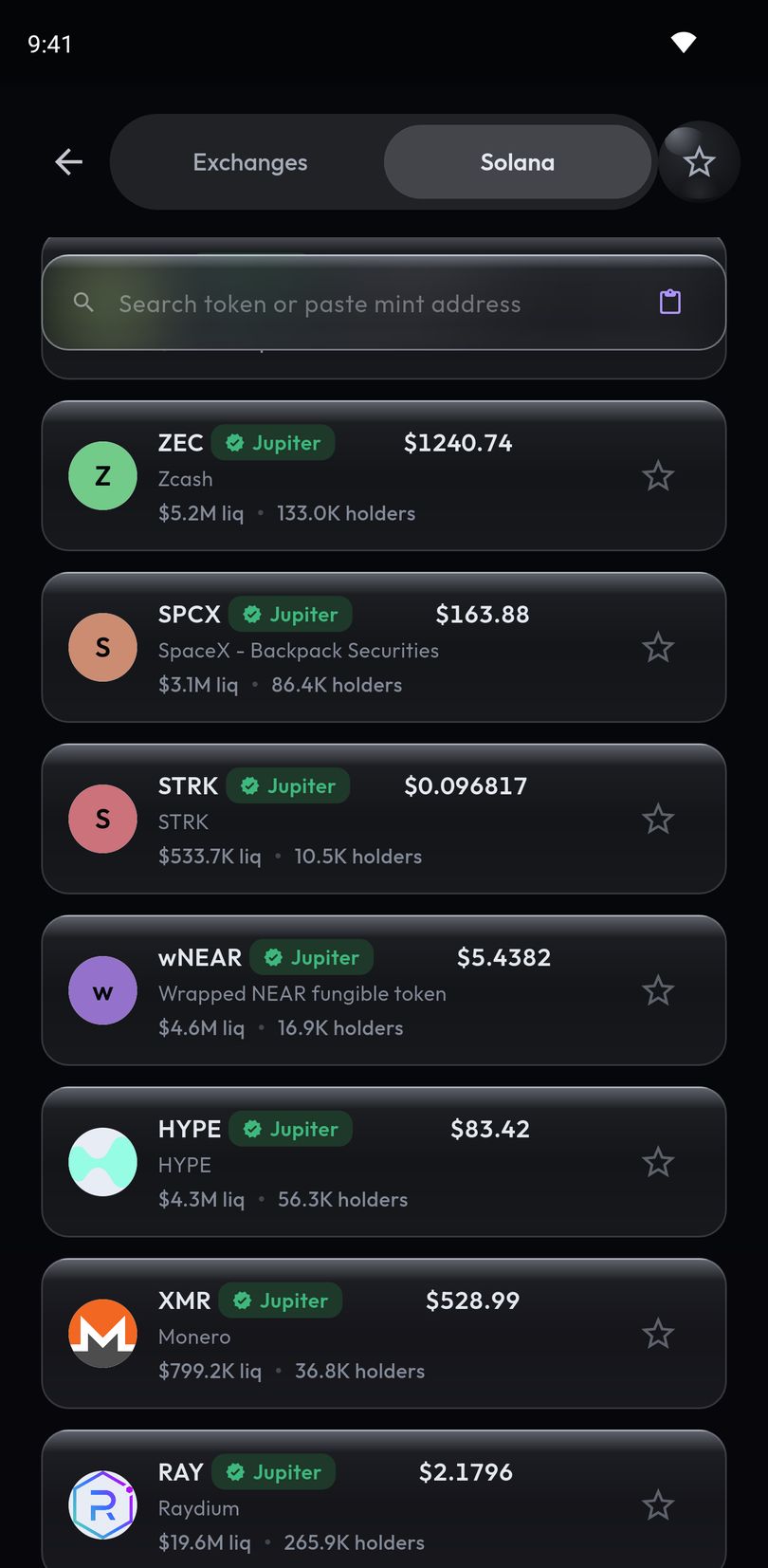
- Switch the coin picker from Exchanges to Solana, and paste the mint address you copied from Phantom into the search field.
- Read the card it resolves to: the price, liquidity, holders and volume where it has them, the pool it found and a Solscan link, with flags for thin liquidity, few holders or a pool under a day old. If you pasted a pool address by mistake, it offers the token that pool trades.
- Tap Use this token, then set a price, or a percentage move from the current price, which is pre-selected for Solana tokens. Choose a rise, a fall or either.
- Choose how it reaches you: it always sends a push notification, which you can make ring as a full-screen alarm through silent mode, and it can send a Telegram message as well.
A percentage alert is fixed when you create it: it measures from the price at that time and does not follow the price afterwards. The watching happens on our servers, so the alert fires with Phantom and our app both closed.
The app does not connect to Phantom or any other wallet, and never asks for a recovery phrase or a private key: the mint address is all it needs. It runs on Android only for now; an iPhone version is in development. On an iPhone today, DEX Screener’s app lists price alerts in its App Store listing (checked 28 October 2026): how to set a price alert on DEX Screener.
Android only for now. An iPhone version is in development.
Common questions
Does Phantom have price alerts?
Phantom’s help centre describes push notifications about social activity, balance and trading updates, market insights and news, and does not describe price alerts that you set on a token. For an alert at a level you choose, copy the token’s mint address from Phantom into a price alert app.
How do I turn on notifications in Phantom?
Phantom’s help centre says to tap your profile avatar in the upper left, go to Settings > Preferences > Notifications and choose which notifications to receive. Your phone also has to allow notifications from Phantom.
Why are my Phantom notifications not working?
Check that Allow Notifications and the type you expect are switched on in Phantom’s Settings > Preferences > Notifications, and that your phone allows notifications from Phantom. On Android, battery saving and Do Not Disturb can also hold them back.
Where is the mint address in Phantom?
On the token’s page: scroll to About on mobile, or Info in the browser extension, and copy the Contract address or Mint field. Phantom notes that on Solana the contract address is called the mint address.
Why does my token show no price in Phantom?
According to Phantom, it may not be able to get market data for the token: the token may have little or no liquidity, be too new or too small for its price sources, or be spam. If the token trades in a pool with real liquidity, a DEX tracker can still show that pool’s price.
Can I get an alarm when a token in my Phantom wallet reaches a price?
Yes, on Android, for Solana tokens and for coins listed on Binance, Coinbase, Kraken, Bybit or KuCoin. For a Solana token, paste its mint address into Crypto Alerts & Alarms, set the level and choose the full-screen alarm; the token needs a live pool on PumpSwap, Raydium, Orca or Meteora DLMM with enough liquidity.
Last updated: 28 October 2026. Wallet apps change often. If anything here is out of date, email support@appsfromzero.com and we will correct it.