
Trust Wallet price alerts: what the built-in one does
Trust Wallet’s own guide describes its built-in price alert as one switch: you add a coin to your watchlist, go to Notification settings, tap Price Alerts and turn it on, and you are then notified if the price of a cryptocurrency on your watchlist changes by 10% or more. Its set-up steps include no way to choose a price or a percentage of your own, so for that, or for an alarm, use a separate alert app.
Crypto Alerts & Alarms is one, on Android. It alerts at the level you choose on the pairs of five exchanges and on Solana tokens, and it can ring a full-screen alarm. It does not cover tokens on other chains, such as Ethereum or BNB Chain, unless one of those five exchanges lists them.
We make Crypto Alerts & Alarms and are not affiliated with Trust Wallet. What this page says about Trust Wallet comes from its own blog, help centre and developer docs, read on 28 October 2026 and linked where used. We have not tried Trust Wallet’s alert on a phone.
Android only for now. An iPhone version is in development.
What Trust Wallet’s price alert does
Trust Wallet’s guide How to Set Up Price Alerts in Trust Wallet (published 5 November 2025, updated 17 July 2026) gives the set-up in three steps. In its words:
- “First, add the cryptocurrency you want to track to your watchlist.”
- “Go to Notification settings and tap Price Alerts.”
- “Toggle the switch on to be notified if the price of a cryptocurrency on your watchlist changes by 10% or more.”
So a single switch covers the coins on your watchlist, and it waits for a change of 10% or more. The guide does not say over what period the 10% is measured, and does not mention a sound or an alarm. Its general advice talks about price targets, but its set-up steps describe only the switch and include no step for entering a price or a percentage of your own. When we searched Trust Wallet’s help centre for “price alert” on 28 October 2026, none of the articles it returned was about price alerts, so this guide is the fullest description we found.
If a heads-up on large moves in your watchlist is all you want, that switch already does it, with nothing else to install.
No alert from Trust Wallet? Three things to check
- The coin is on your watchlist. The alert is described for coins on your watchlist, which is why adding the coin there is the guide’s first step.
- The move reached 10%. The guide describes the alert for changes of 10% or more; a smaller move is not described as setting it off.
- Your phone lets Trust Wallet notify you. Its notifications have to be turned on in Android’s settings. Google’s Pixel help (checked 28 October 2026) also warns that Battery Saver and Adaptive Battery “can stop or delay some alerts to save power”, while Do Not Disturb “silences most notifications”. The menus differ by phone maker and Android version. Our Android checklist goes through them.
Why a token shows no price in Trust Wallet
Trust Wallet’s developer FAQ says it “sources pricing data from CoinMarketCap (CMC)”. A token’s price appears once its correct contract address is linked to its CoinMarketCap listing and it has “sufficient transaction volume” there. Its help centre adds that the wallet shows “estimated values based on aggregated data from third-party price providers, not real-time trading prices” (Why Is the Token Price Different in Trust Wallet?). Without a price, there is nothing for a price alert to measure. For a Solana token, our Phantom guide shows where else to see one.
Trust Wallet’s alert and Crypto Alerts & Alarms, side by side
| Trust Wallet’s price alert | Crypto Alerts & Alarms | |
|---|---|---|
| What it watches | The cryptocurrencies on your watchlist, with one switch | One market per alert: a pair on Binance, Coinbase, Kraken, Bybit or KuCoin, or a Solana token’s pool |
| When it fires | A change of 10% or more | Above, below or either side of a price you set, or a percentage move you choose |
| Which price | Not mentioned; its developer docs say Trust Wallet’s prices come from CoinMarketCap | The exchange pair you picked, or the token’s pool |
| How it reaches you | A notification; sound and alarm not mentioned | A push every time, which can ring as a full-screen alarm through silent mode on Android, plus Telegram if you add it |
Where Crypto Alerts & Alarms fits, and where it does not
It is the better tool when you want a level of your own, or an alarm, on:
- A coin listed on Binance, Coinbase, Kraken, Bybit or KuCoin. That is over 5,000 pairs across more than 1,200 coins. You pick the exchange and the pair, such as BTC/USDT on Binance or ETH/EUR on Kraken, so the alert follows that market rather than an average of many.
- A Solana token, by name or mint address, once it has a live pool on PumpSwap, Raydium, Orca or Meteora DLMM with enough liquidity.
It is the wrong tool for:
- Tokens on any other chain, such as Ethereum, BNB Chain, Base or Tron, unless one of the five exchanges lists them: outside Solana it cannot watch a token by its contract address. A DEX tracker that covers the chain fits better. DEX Screener’s Google Play listing names price alerts and “Support for 60+ chains”, and GeckoTerminal’s features page lists “Customisable Alerts” (both checked 28 October 2026).
- Your wallet as a whole. It does not connect to Trust Wallet, read your balances or follow your watchlist. You set each alert yourself, and it never asks for a recovery phrase or a private key.
- An iPhone. It is Android only for now; an iPhone version is in development.
- Alerts by email, SMS or phone call. It cannot send an alert by any of them.
Setting a level of your own
- Install Crypto Alerts & Alarms from Google Play and start a new alert.
- Find the coin and pick the exchange and pair to follow. For a Solana token, switch the picker to Solana and paste its mint address.
- Set a price to rise above, a price to fall below, or both; or a percentage move from the current price, up, down or either way.
- Every alert sends a push notification: choose whether it also rings as the full-screen alarm and goes to Telegram, then save.
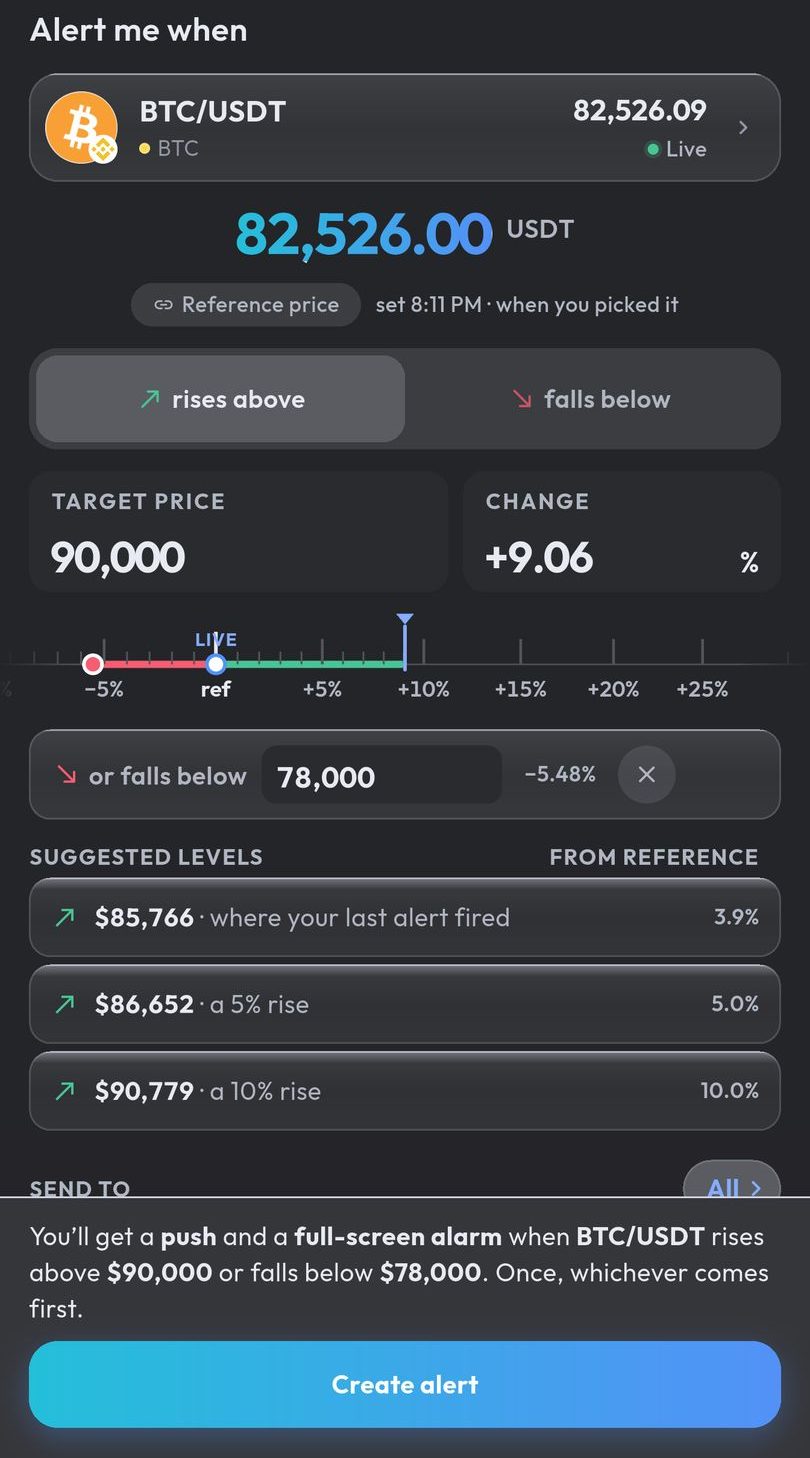
Unlike a watchlist switch, each alert here is one level, or one pair of levels, on one market. A percentage alert counts from the price when you create it and does not follow the price afterwards. Prices are watched on our servers, so alerts fire with the app closed. How big a percentage alert should be.
Android only for now. An iPhone version is in development.
Common questions
Does Trust Wallet have price alerts?
Yes. Trust Wallet’s own guide describes a Price Alerts switch in its notification settings that notifies you if the price of a cryptocurrency on your watchlist changes by 10% or more.
Can I set a custom price alert in Trust Wallet?
Trust Wallet’s guide gives no steps for choosing your own price or percentage: the set-up it describes is one switch for changes of 10% or more in the coins on your watchlist. For a level of your own, use a separate price alert app.
How do I turn on price alerts in Trust Wallet?
According to Trust Wallet’s guide, add the coin to your watchlist, go to Notification settings, tap Price Alerts and turn the switch on. Your phone also has to allow notifications from Trust Wallet.
Why is my token’s price not showing in Trust Wallet?
Trust Wallet’s developer docs say its prices come from CoinMarketCap: a price appears once the token’s correct contract address is linked to its CoinMarketCap listing and the token has sufficient transaction volume there.
Can Crypto Alerts & Alarms alert me on any token in my Trust Wallet?
No. It covers coins listed on Binance, Coinbase, Kraken, Bybit or KuCoin, and Solana tokens with a live pool on PumpSwap, Raydium, Orca or Meteora DLMM with enough liquidity. It cannot watch tokens on other chains by contract address, and it does not read your wallet.
Last updated: 28 October 2026. Wallet apps change often. If anything here is out of date, email support@appsfromzero.com and we will correct it.