
How to set up crypto price alerts that actually reach you
A useful price alert comes down to three choices: which price it watches, what kind of move it waits for, and whether it fires once or keeps watching. Then test it the same day. Often, the reason an alert is missed is the phone, not the alert: notifications switched off, Do Not Disturb, or a battery saver holding the app back.
Android only for now. An iPhone version is in development.
Monitoring prices without watching the chart
Most days, nothing happens that you need to see. Over the 90 days to 27 October 2026, Bitcoin closed 5% or more away from the previous close on 6 days, Ethereum on 3 and Solana on 9. An alert at the level you care about does the watching for you, so you can close the chart and look again only when it fires. Past figures, not a forecast.
Which price: one exchange’s pair, or an average
A coin does not have one price. Each exchange has its own trades, and each pair has its own quote currency, so BTC/USDT on Binance and BTC/USD on Coinbase are usually close but rarely identical. Price trackers often show an average across exchanges, which nobody actually trades at.
If you watch a coin on a particular exchange, set the alert on that exchange’s pair, in the currency you think in. Crypto Alerts & Alarms follows one pair on one exchange, across Binance, Coinbase, Kraken, Bybit and KuCoin, with euro, pound and other currency pairs where the exchange lists them. Pairs for each coin.
A level, a percentage, or both sides
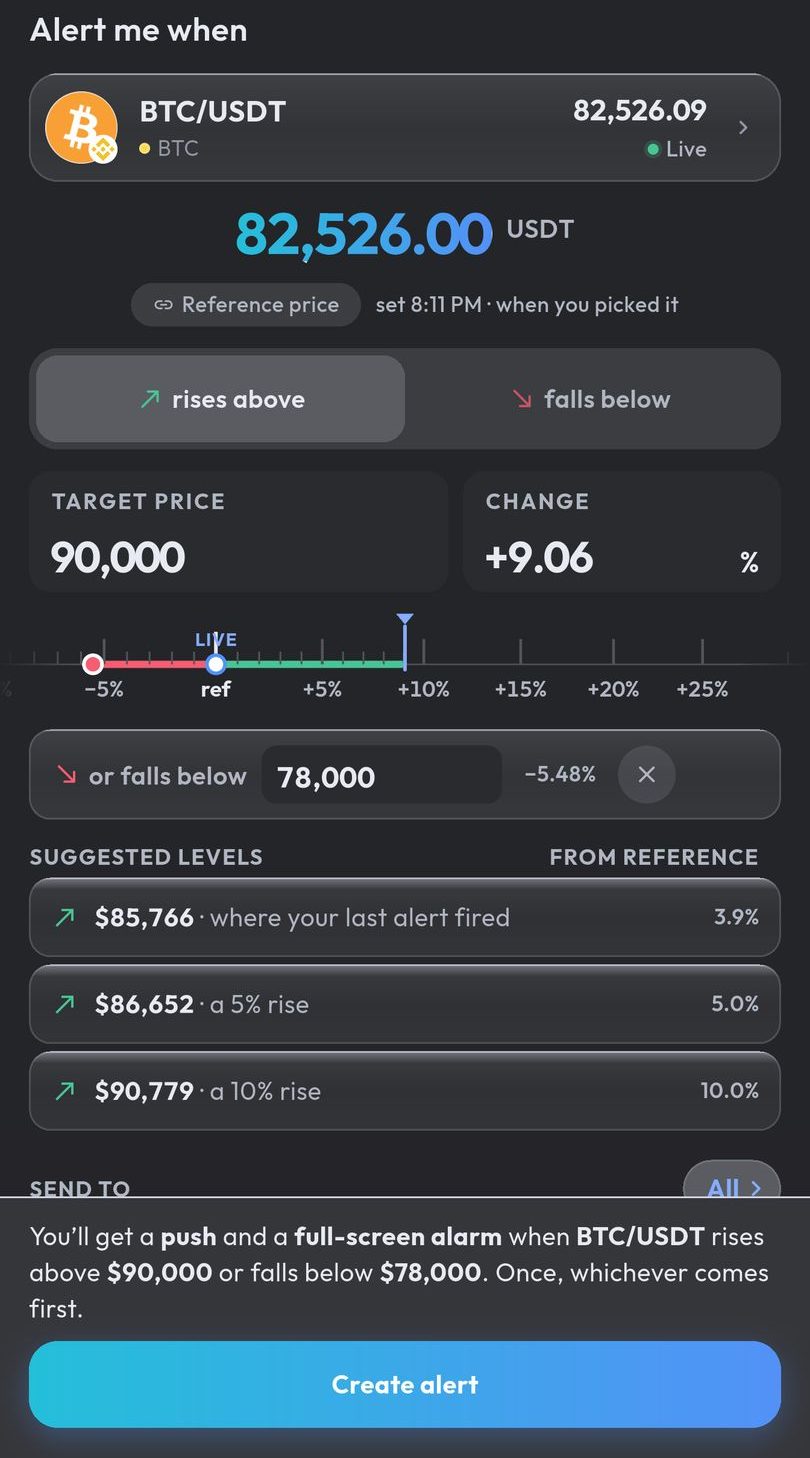
- A price level fires when the price rises above or falls below a number you choose.
- A percentage move fires when the price has moved that far from where it was when you set the alert.
- Both sides fires on whichever comes first: a rise above one level or a fall below another.
Once, or repeating with a pause in between
An alert can fire once and switch off, which suits a level you only need to hear about one time. Or it can keep watching with a cooldown between firings, from 5 minutes to a day, which suits a level the price keeps returning to. Without a cooldown, a price that hovers around your level could notify you again and again.
Test it today with a range close to the price
The only way to know an alert reaches you is to watch one fire. Set a test alert a little above and below the current price and lock the phone. Measured from each day’s opening price over the 90 days to 27 October 2026, a range 0.5% either side of Bitcoin’s price was crossed on 86 of the 90 days, after a median of 3 hours, so a test that close usually fires the same day. Past figures, not a forecast.
Make sure your phone delivers it
- Notifications: allow them when the app asks. Without that permission, Android cannot show any alert from it.
- Do Not Disturb: standard notifications are silenced, as they should be. The alarm is posted as an alarm, so it is built to get through when your Do Not Disturb settings allow alarms. Menus differ by phone and Android version: Do Not Disturb exceptions, step by step.
- Battery savers: aggressive settings on some phones can delay notifications. If an alert arrives late, take the app out of battery optimization.
- Waking up: a notification at 3 AM waits in the tray. If you need to be woken, the alert has to ring like an alarm: how the full-screen alarm works.
Alerts in Crypto Alerts & Alarms are checked on our servers, not on your phone, so they fire with the app closed. The phone only has to receive them.
Android only for now. An iPhone version is in development.
Common questions
How do I get notified when Bitcoin drops?
Set an alert on a Bitcoin pair, such as BTC/USDT on Binance, that fires when the price falls below a level you choose, or falls by a percentage from where it is now. Then allow notifications for the app and set a small test alert the same day, so you know it reaches your phone.
BTC/USDT, BTC/USDC or BTC/USD: which one should my alert follow?
Follow the one you watch, on the exchange you use, because each pair is its own market with its own trades: BTC/USDT and BTC/USDC are priced in dollar stablecoins and BTC/USD in US dollars, and the three usually sit close together without matching exactly, so the same level can be reached on one pair before another. Crypto Alerts & Alarms lists all three for Bitcoin, and each alert follows one pair on one exchange. How far apart the pairs have been, measured.
Should I use a price level or a percentage?
A level when a particular price matters to you; a percentage when the size of the move matters more than the exact price. A range that fires above or below covers both directions with one alert.
Why did my price alert not arrive?
Often because of the phone, not the alert: notifications switched off for the app, Do Not Disturb, or a battery saver holding the app back. The settings that matter on Android.
Last updated: 28 October 2026. Spot a mistake? Email support@appsfromzero.com and we will correct it.