
TabTrader shut down: where to set your price alerts now
TabTrader, the multi-exchange crypto terminal, stopped operating on 21 August 2026. If you used it for price alerts, you can set the same alerts again in a few minutes. If it held API keys to your exchange accounts, revoke them first. This page covers both, and where each kind of TabTrader user fits now.
We make Crypto Alerts & Alarms, one of the alternatives below, and we are not affiliated with TabTrader. Facts about TabTrader come from its own archived website and Google Play listing and from news reports, each linked; facts about other apps come from their own pages. All were checked on 28 October 2026.
Android only for now. An iPhone version is in development.
What happened to TabTrader
According to news reports, TabTrader “permanently ceased operations” on 21 August 2026, after a short email to users. No reason was published. On 28 October 2026 we checked for ourselves: tabtrader.com no longer resolves, and TabTrader’s Google Play listing returns “Not Found”.
In its own words, TabTrader offered “Real-time charts, smart alerts, and seamless trading in one crypto terminal” (its homepage, archived 14 May 2026). Its Google Play listing, archived 10 June 2026, described “crypto price alerts” and “technical alerts” that sent “notifications triggered by specified technical indicator conditions or thresholds”, and invited users to “connect your exchange accounts via API keys”.
First, revoke the exchange API keys you gave it
If you traded or tracked a portfolio through TabTrader, you probably created API keys on your exchanges and pasted them into the app. Those keys keep working until you delete them, whatever happens to the app that held them. Log in to each exchange you connected, open its API management page, and delete any key you created for TabTrader. It takes a minute per exchange, and it is worth doing even if you have stopped trading.
Crypto Alerts & Alarms never asks for API keys: it only reads public prices.
Used it for price alerts? Set the same alert on the same pair
TabTrader’s listing named the exchanges it supported, including Binance, Bybit, Coinbase Advanced, Kraken and KuCoin. Crypto Alerts & Alarms covers those five, with over 1,200 coins, so for most TabTrader price alerts there is a direct replacement:
- Install Crypto Alerts & Alarms from Google Play.
- Search the coin and pick the same exchange and pair you watched in TabTrader, for example BTC/USDT on Binance.
- Set the same level, or a percentage move from the current price, above, below or either side.
- It arrives as a push notification; you can make it a full-screen alarm that rings through silent mode on Android, and send it to Telegram too.
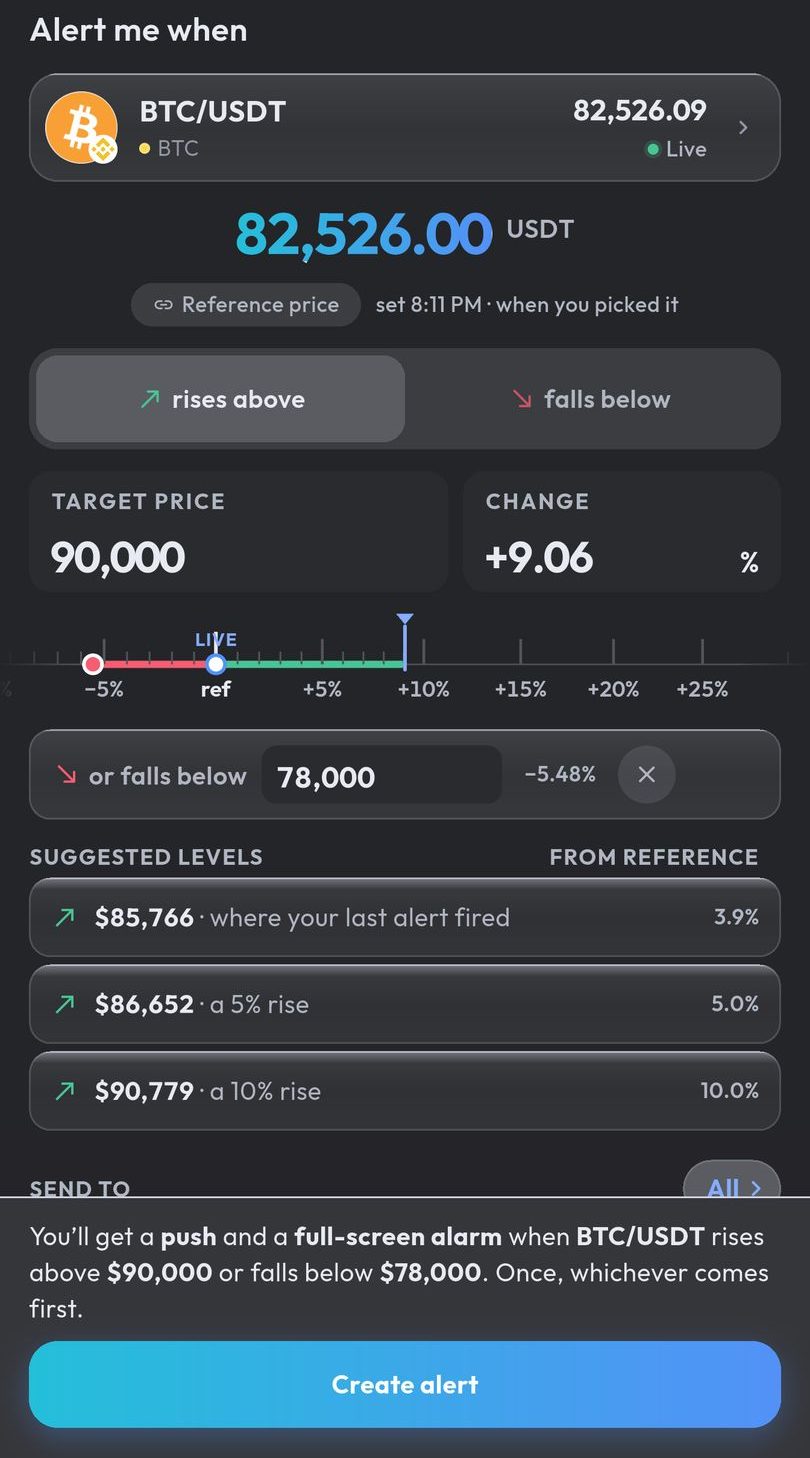
Alerts are checked on our servers, so they fire with the app closed. Tokens TabTrader never covered work too: any Solana token by name or mint address, once it has a live pool on PumpSwap, Raydium, Orca or Meteora DLMM.
TabTrader alternatives, by what you used it for
Price alerts that reach you, even at night
- Crypto Alerts & Alarms (Android): alerts on Binance, Coinbase, Kraken, Bybit and KuCoin pairs and Solana tokens, as a push notification that can ring as a full-screen alarm through silent mode and go to Telegram too.
- Cryptocurrency Alerting (web, iPhone, Android): alerts by email, push, SMS, automated phone calls, Telegram, Discord, Slack or webhook. How it compares.
Technical and indicator alerts
- Coin Guardian (Android): its listing offers RSI, moving-average and Bollinger Band alerts.
- A charting platform with built-in alerts fits this better than a price-alert app. Crypto Alerts & Alarms alerts on price levels and percentage moves, not on indicators.
Watchlists and portfolio tracking
- CoinGecko and CoinMarketCap (iPhone, Android): trackers with price alerts on listed coins, sent as push notifications.
Trading on several exchanges from one app
- Each exchange’s own app trades its own markets and has its own price alerts. Crypto Alerts & Alarms does not trade; it only tells you when a price moves.
Side by side
| App | Runs on | Price alerts | Indicator alerts | How alerts reach you | Trading |
|---|---|---|---|---|---|
| TabTrader (stopped 21 Aug 2026) | Android, iPhone, web | “crypto price alerts” | “technical alerts” on indicator conditions | Notifications | Yes, through exchange API keys |
| Crypto Alerts & Alarms (our app) | Android; iPhone in development | Price or percentage, on Binance, Coinbase, Kraken, Bybit and KuCoin pairs, and Solana tokens by mint | No | Push, full-screen alarm through silent mode, Telegram | Never; no API keys |
| Coin Guardian | Android | Yes, on 8 exchanges | RSI, moving averages, Bollinger Bands | Includes a 5-minute siren | Not mentioned |
| CoinGecko | iPhone, Android | “any token listed on CoinGecko” | Not mentioned | Push | Not mentioned |
| Cryptocurrency Alerting | Web, iPhone, Android | Price, percentage within a time window, volume | Not mentioned | Email, push, SMS, phone calls, Telegram, Discord, Slack, webhook | Not mentioned |
Sources: TabTrader’s archived Google Play listing and archived homepage; Coin Guardian; CoinGecko; Cryptocurrency Alerting.
Android only for now. An iPhone version is in development.
Common questions
What happened to TabTrader?
According to news reports, TabTrader permanently stopped operating on 21 August 2026, after telling users by email; no reason was published. On 28 October 2026, tabtrader.com no longer resolved and its Google Play listing returned “Not Found”.
Can I get my TabTrader alerts back?
Not from TabTrader, as far as we can tell. Set them again in another app: if they were on Binance, Coinbase, Kraken, Bybit or KuCoin, Crypto Alerts & Alarms can watch the same pair on the same exchange.
Does Crypto Alerts & Alarms need my exchange API keys?
No. It never connects to your exchange account, never asks for an API key and never places a trade. It reads public prices and tells you when they cross your level.
Is there a TabTrader alternative for iPhone?
Crypto Alerts & Alarms is Android only for now; an iPhone version is in development. Cryptocurrency Alerting and the CoinGecko app run on iPhone and send price alerts.
Last updated: 28 October 2026. If anything here is out of date, email support@appsfromzero.com and we will correct it.